Gym Software
Gym Management Software in India: 15 Features Every Gym Owner Should Check Before Buying
A practical buying checklist for gym owners who want fewer missed renewals, cleaner operations, better member experience, and clear growth reports.
Buying gym management software in India is no longer just a question of replacing a register or spreadsheet. For many gym owners, the software becomes the daily operating system for leads, members, payments, attendance, renewals, staff work, and reporting. The right choice can reduce admin work and protect revenue. The wrong choice creates another tool your team avoids.
The timing matters. India's fitness market is expanding, and competition is getting sharper. The Health & Fitness Association, citing Deloitte research, reported that India had around 12.3 million fitness facility members in 2024 and projected 23.3 million by 2030. At the same time, software adoption is growing globally: Technavio projects the gym management software market to grow from 2025 to 2030, driven partly by AI and predictive analytics. In simple terms: more gyms will compete for members, and better systems will become a real advantage.
Before features, check one thing: workflow fit
A long feature list is useful only if it matches how your gym actually runs. A neighborhood gym may care most about attendance, renewals, dues, and WhatsApp-style follow-ups. A class-based studio may need strong scheduling, capacity control, trainer calendars, and reminders. A growing fitness academy may need staff permissions, branch-level reporting, and a member mobile app. If you run one owner-led branch, use this lean software starter plan for small gyms to decide what to configure first and what can wait.
So use this article as a buying checklist. For every feature, ask: will this save time, reduce missed revenue, improve the member experience, or give the owner clearer decisions? If the answer is no, it may not be a priority for your gym.
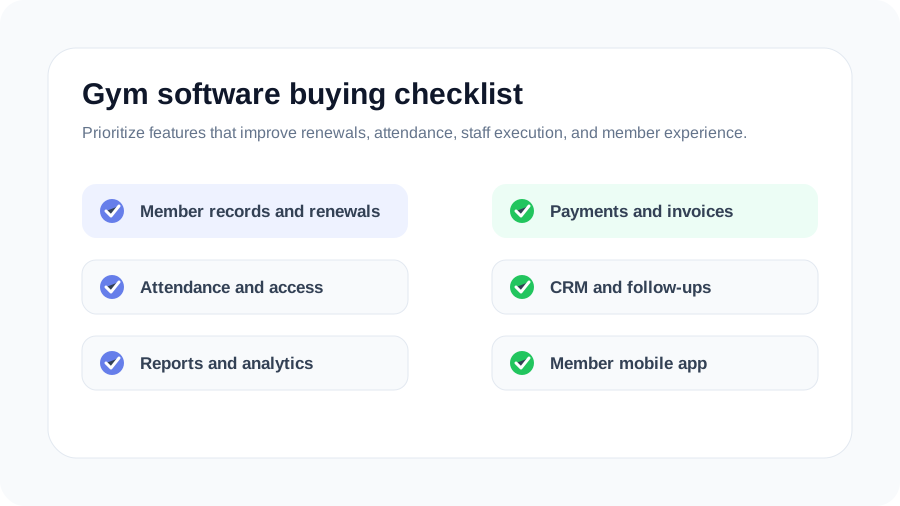
15 features every gym owner should check before buying
1. Complete member management
Member management is the base of any gym management software. You should be able to store member profiles, plans, start and end dates, health notes, attendance history, payment history, documents, and communication history in one place. If staff need to check three files before answering a member question, the software is not solving the real problem. Use our first-30-days member onboarding checklist to test that hand-off with your front desk.
2. Membership plans, freezes, upgrades, and renewals
Indian gyms often sell monthly, quarterly, half-yearly, annual, personal training, family, student, and promotional plans. Good software should support flexible plan creation, freeze periods, upgrades, extensions, discounts, and renewal reminders. This is where small revenue leaks happen if everything is manual. Use this gym membership software lifecycle guide to test plans, date rules, states, freezes and corrections. For a practical front-desk messaging process, use our gym membership renewal reminder templates.
3. Billing, payment tracking, and invoices
Billing is not just about collecting money. It is about knowing who paid, who has dues, which payment mode was used, which invoice was shared, and which renewals are at risk. For India, check support for common payment workflows such as UPI, cash, card, bank transfer, receipts, invoices, and payment reminders. Local buying guides also highlight automated invoicing and payment reminders as a core benefit for gyms. Use this gym billing software workflow for India to test the complete path from membership sale to balance and refund.
4. Attendance tracking and check-in controls
Attendance tells you whether members are engaged. The software should support manual check-ins at minimum, and ideally QR, RFID, barcode, or biometric integrations depending on your setup. More important than the entry method is the insight: who has stopped coming, which time slots are crowded, and which members need outreach before they churn. Use this gym attendance software guide for India to compare manual, QR, card and biometric workflows at the real entrance.
5. Lead management and gym CRM
Every missed lead is paid marketing wasted. Gym CRM software should help you capture enquiries, assign follow-ups, track trial status, record calls, schedule reminders, and see conversion by source. This is especially useful for gyms running Instagram ads, Google Business Profile enquiries, referral offers, and walk-ins. Use this gym CRM workflow for India to test the full journey from a genuine enquiry to member enrolment.
6. Automated reminders and segmented communication
Reminders are one of the highest-impact automation features. Look for renewal reminders, payment reminders, booking reminders, birthday messages, missed-attendance alerts, and lead follow-up prompts. Booking software providers commonly emphasize automated reminders and push notifications because they reduce no-shows and help members stay consistent.
7. Booking and class scheduling
If you run yoga, Zumba, CrossFit-style batches, personal training, group classes, swimming, martial arts, or physiotherapy slots, booking software matters. Members should see available slots, book easily, receive reminders, and cancel or reschedule within your rules. Staff should see capacity, waitlists, trainer assignment, and attendance without maintaining a separate sheet. Use our guide to reducing gym class no-shows and handling waitlists fairly to design the operating policy around those tools.
8. Staff and trainer management
Owners cannot personally monitor every shift. Your software should support staff roles, trainer schedules, task ownership, permission-based access, and activity logs. A front desk user may need attendance and dues access, while an owner needs revenue, reports, and settings. Good permissions protect data and reduce mistakes. Use our daily gym operations checklist to test how records move between opening, handover, and close.
9. Member mobile app or portal
Members increasingly expect self-service. A member app or portal can show plan details, attendance, booking options, renewal status, payment links, announcements, and notifications. This reduces front desk load and makes the gym feel more professional. If the app is clunky, members will ignore it, so test the member experience before buying.
10. Reports owners can actually use
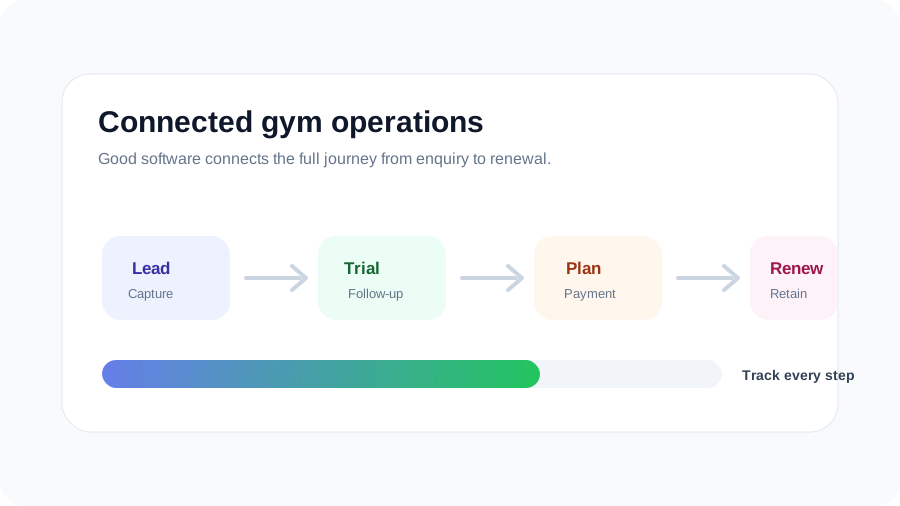
Reports should answer business questions, not just export data. Check for revenue by month, active members, expiring members, overdue payments, lead conversion, attendance trends, class occupancy, source-wise performance, trainer activity, and member retention. If reports are hard to read, they will not guide decisions. Use our weekly gym KPI scorecard to test the definitions and decisions behind those reports.
11. Retention and churn signals
Retention is where software can quietly protect revenue. Look for at-risk member lists, inactivity alerts, renewal pipelines, missed-attendance tracking, and engagement history. A member who has not visited for 12 days should not become visible only when the plan expires.
12. Website, SEO, and Google Business support
Many gyms depend on local discovery. If your software provider also supports a gym website, enquiry capture, landing pages, or Google Business Profile workflows, it can help turn local searches into leads. This is especially useful for searches like "gym near me," "personal training near me," or "yoga classes near me." For a practical implementation plan, read our guide to local SEO for gyms in India.
13. Multi-branch readiness
Even if you run one branch today, check whether the software can grow with you. Multi-branch support should include branch-wise members, revenue, staff access, plans, reports, and consolidated owner dashboards. Migrating later is harder than choosing a system that can scale. Use this multi-branch gym software control checklist to test branch ownership, staff access, cross-branch memberships, finance reconciliation and reporting with fictional records.
14. Data ownership, exports, and migration support
Ask how your existing member data will be imported and how your data can be exported if needed. You should not feel locked out of your own records. CSV exports, clear data fields, and migration assistance matter, especially if you already have years of member and payment history. Before sharing a file, use our practical guide to moving from Excel to gym management software in India to plan the field map, test batch and cutover checks.
15. Onboarding, support, and ease of use
The best gym software is the one your team actually uses. During the demo, ask who will train your staff, how support works, how fast issues are resolved, and whether your common workflows can be completed without confusion. A feature-rich system with poor onboarding can fail inside the first month.
Do not buy software only for today's admin problem. Buy the operating system your gym can grow into.
Questions to ask during a software demo
A good demo should be practical. Instead of only watching a polished presentation, ask the vendor to perform real tasks. Our gym management software demo checklist adds fictional scenarios, edge cases and an evidence-based scoring method:
- Add a new lead, schedule a follow-up, and convert that lead to a member.
- Create a membership plan, collect a payment, and generate a receipt.
- Mark attendance and show inactive members who need follow-up.
- Book a class, check capacity, and send a reminder.
- Show owner reports for revenue, renewals, dues, and lead conversion.
- Explain how data import, staff training, and support will work.
If these workflows feel simple in the demo, your staff is more likely to adopt the software. If they feel complex, ask whether the system can be configured around your gym's actual process.
How Nexicat fits this checklist
Nexicat is built for gym owners and fitness studios that want one connected platform instead of scattered tools. The product focuses on member management, attendance, bookings, staff workflows, CRM, sales management, campaign management, reports, member mobile app, staff mobile app, website, SEO, and Google Business Profile support.
That means your team can manage the day-to-day gym workflow while you get a clearer picture of growth. You can explore the full Nexicat feature set, review gym management software pricing, calculate the full first-year amount with our India gym software cost guide, or book a demo to see how the system would work for your gym.
Final thought
Gym management software is not just an expense. It is a decision about how your gym will operate every day. The right platform helps your team follow up faster, collect payments cleaner, manage members better, and make decisions with confidence. Before buying, use the 15 features above as your checklist and choose the system that fits your workflow, your team, and your growth plan.
Nexicat Editorial
We write about gym operations, member retention, and practical systems that help fitness businesses grow with less chaos.