
Gym CRM software · India
Gym CRM Software in India: From Enquiry to Member
Turn walk-ins, calls and website enquiries into a shared pipeline with clear stages, staff ownership, visit outcomes and honest source reporting.
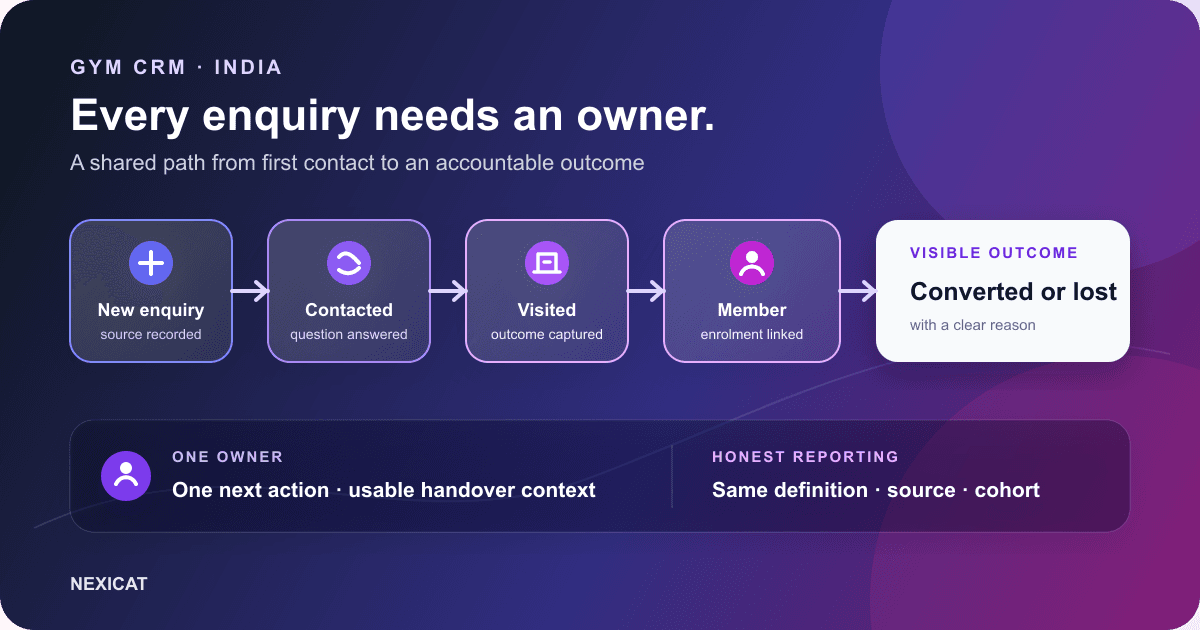
1. Give every genuine enquiry a visible next step
A gym CRM is the sales record between first enquiry and paid membership. It should answer five questions without searching a notebook or staff WhatsApp chat: who enquired, where they came from, what has happened, who owns the next action and what the current outcome is.
Do not count every impression, click or missed call as a lead. Google's Business Profile performance documentation says its calls metric counts clicks on the call button, while website clicks and direction requests are separate interactions. Define when your gym creates a lead—for example, after a person provides contact details and asks about a membership, trial or visit.
This definition makes channel comparisons more honest. The local SEO guide covers how nearby prospects discover the branch; this guide starts when a real enquiry enters the sales process.
2. Capture the minimum useful lead record
At first contact, record only what the team needs to continue the conversation:
- name and one verified contact route;
- branch and enquiry source;
- the person's stated interest or practical question;
- assigned staff member;
- current stage; and
- next action or concise context.
Use a controlled source list such as Google Business Profile, website, walk-in, referral or campaign name. Avoid free-text variants like “Google,” “GMB” and “Maps” if they represent the same source. Keep “unknown” available instead of forcing staff to guess.
Do not collect medical histories, identity documents or detailed fitness data merely because the CRM has a notes field. Confirm current privacy requirements and retention with qualified advice; MeitY's Digital Personal Data Protection Rules, 2025 page is the official starting point for the notified rules and timeline.
3. Define five stages the whole team can use
A lean gym pipeline can use five stages:
- New: the enquiry is recorded but a meaningful response is not yet confirmed.
- Contacted: a staff member has made or completed the first useful contact according to the gym's rule.
- Visited: the prospect completed the branch visit or trial your team defines.
- Converted: the person completed the approved member-enrolment and payment process.
- Lost: the enquiry is closed without conversion for a recorded reason.
Write the entry rule for every stage. “Contacted” should not mean that someone merely opened the record, and “converted” should not mean that a prospect verbally said yes. Keep stages about observable events rather than enthusiasm.
These five stages match Nexicat's current lead workflow. A business with a different sales process should test whether its required states can be represented before adopting any CRM.
4. Assign one owner and one next action
Every open lead needs one responsible staff member. Shared ownership often means no ownership, especially across opening and evening shifts.
The record should make the next useful action clear: answer a pricing question, confirm a branch visit, prepare a trial, call after the visit or close the enquiry. Include enough context for another authorised colleague to continue without asking the prospect to repeat everything.
Review unassigned and stale open leads at shift handover. Age alone does not prove neglect—a prospect may have asked to be contacted next month—but an old record with no reason or next step is an operational gap. The CRM should help the manager find that gap; it cannot make a useful sales conversation happen automatically.
5. Design a response rule around actual opening hours
Do not copy a universal “respond within five minutes” promise. Set a target your staffed hours and channels can support, then publish what happens outside those hours.
Use the first response to answer the person's question and offer one appropriate next step. A prospect asking about morning strength training needs a clear branch-specific answer, not a long template about every facility feature. If a visit is relevant, confirm the branch, date, time, what to bring and any trial terms.
Track whether the next step was agreed, not just whether a message was sent. A high activity count can hide unanswered questions and repeated contact that the prospect did not request.
6. Connect the visit to the original enquiry
A scheduled visit is not a completed visit. Keep the booking, arrival and outcome distinct so staff can see where the hand-off failed.
Before the prospect arrives, the assigned person should know the stated interest and promised time. Afterward, record a short factual outcome: visited, reschedule requested, did not attend, joined, declined or still deciding according to your process. Do not invent motivation or add sensitive observations that are unnecessary for follow-up.
If the prospect joins, convert the existing lead into the member-enrolment workflow where the product supports it. Avoid creating an unrelated member profile that loses source and conversation context or leaves the lead open forever.
7. Keep follow-up expected and easy to stop
A phone number in a lead record is not permission for unlimited campaigns. Record how the person asked to be contacted, what they expect and any stop request.
Meta's official WhatsApp Business Messaging Policy says a business may contact a person on WhatsApp only when it has the phone number and opt-in permission, and must respect requests to stop. Its opt-in guidance recommends setting clear expectations about message categories and providing clear opt-out instructions.
Keep one-to-one enquiry follow-up separate from broad promotions. If a person declines further contact, close or restrict the communication workflow promptly while preserving only the record required for the gym's approved purpose. Nexicat does not claim automatic WhatsApp delivery in this article.
8. Close lost leads with a usable reason
An open pipeline that never closes becomes a storage list. When the gym decides an enquiry is no longer active, set it to lost and record a short reason the team can understand.
Use a small, neutral reason list such as price or plan mismatch, location or timing mismatch, chose another option, duplicate, invalid contact, not interested or no decision after the agreed process. Add a note only when it changes the interpretation. Avoid blaming language and avoid guessing.
Review patterns as questions, not conclusions. A rise in “timing mismatch” may suggest schedule friction, inconsistent coding or a campaign reaching the wrong audience. Read sample records before changing prices, staffing or marketing.
9. Measure one fixed lead group from source to outcome
Choose a cohort of leads created in a defined date range and let enough time pass for the agreed sales cycle. Then report counts at each stage and the number still open.
Use transparent formulas:
Enquiry-to-visit rate = visited leads from the cohort ÷ total valid leads in the cohort × 100
Enquiry-to-member rate = converted leads from the cohort ÷ total valid leads in the cohort × 100
Keep invalid or duplicate records visible as data-quality exceptions rather than quietly changing the denominator. Compare sources only when the lead definition, date range and outcome window are the same. A channel can produce fewer leads but more suitable enquiries; cost, capacity and service quality still matter.
Use the gym KPI guide for a broader weekly scorecard. These rates describe recorded outcomes and do not prove that the CRM caused them.
10. Test Nexicat with one enquiry-to-member journey
Nexicat's current product supports lead profiles with source, status, assigned staff and notes; branch booking; lead status and source views; conversion into member enrolment; and reports for source performance and open follow-up workload. These claims are grounded in the current web and backend code.
Nexicat does not claim here that it imports every advertising lead automatically, sends automated WhatsApp follow-ups or guarantees a conversion increase. Configuration and plan availability should be confirmed for your gym.
Create a fictional website enquiry in a demo. Assign it, move it through contacted and visited, convert it using a real plan scenario, then inspect the source and open-pipeline reports. Explore leads, campaigns and follow-up or book a Nexicat demo with your current enquiry handover process.
Test one complete lead journey
See how Nexicat handles a gym enquiry.
Bring a fictional enquiry and follow it from source and assignment through contact, branch visit, member enrolment and reporting.
Gym CRM questions
What is gym CRM software?
Gym CRM software keeps enquiries, sources, stages, staff ownership, follow-up context, visits and outcomes in one sales record. It complements gym management software by connecting acquisition work to member enrolment and reporting.
Which stages should a gym lead pipeline use?
A lean pipeline can use New, Contacted, Visited, Converted and Lost, provided the gym writes an observable entry rule for each stage. Add complexity only when the team can maintain the extra states consistently.
Can gym CRM software automatically increase membership sales?
No result is automatic or guaranteed. A CRM can make records, ownership and pipeline gaps visible, while conversion also depends on lead quality, offer, location, pricing, staff conversations, capacity and implementation.
Can a gym send WhatsApp follow-ups to every lead?
A saved phone number alone is not enough. WhatsApp's Business Messaging Policy requires the number and opt-in permission, and businesses must honour stop requests. Check current platform rules and applicable law for the gym's exact use.
About Nexicat Editorial. We write practical guides to gym operations and growth. Sources linked beside the relevant guidance were checked on 24 September 2026. This guide provides general operational information, not legal or privacy advice. Product, messaging and data-protection requirements can change. Verify the current setup with the relevant provider and qualified advisers.