
Gym billing software · India
Gym Billing Software in India: Payments, Invoices and Dues
Connect every membership charge to its invoice, verified payment, receipt and remaining balance without confusing operational records with accounting advice.
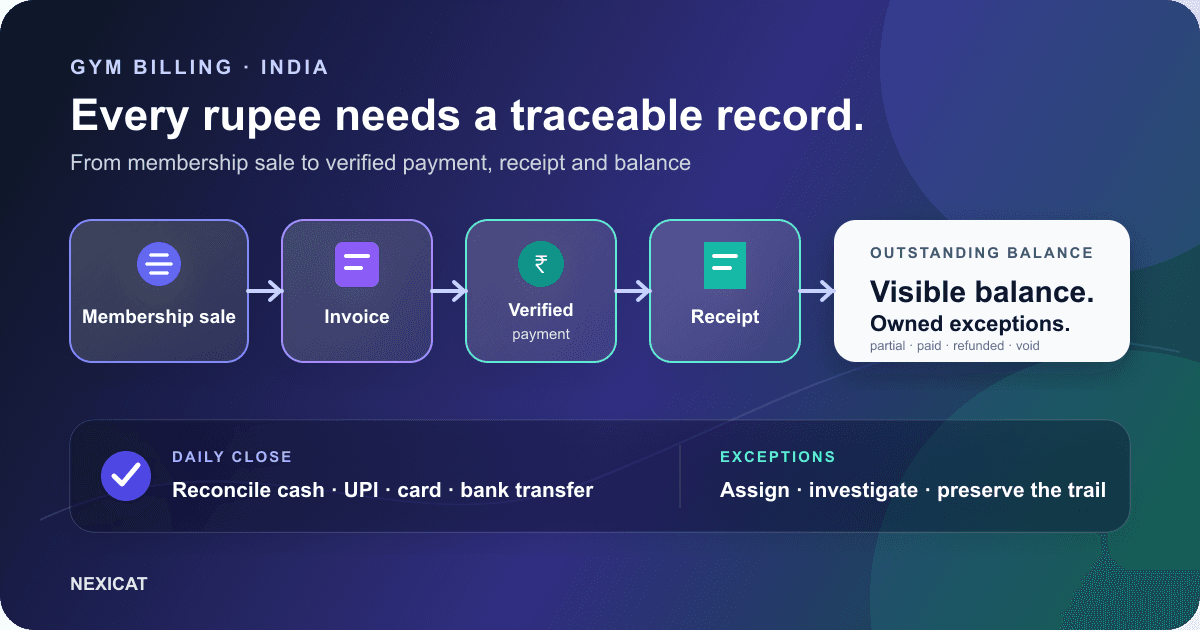
1. Separate the five records in a gym payment
A membership payment can create several related records. Treating them as one thing causes confusion at the front desk:
- Membership or sale: what the member bought and the service period.
- Invoice: what the gym charged, including line items, discounts and applicable tax treatment.
- Payment transaction: what was actually received, when and through which method.
- Receipt: evidence that a specific amount was recorded as received or refunded.
- Outstanding balance: the invoice total less valid collections, adjusted for approved refunds or corrections.
An invoice is not proof that money reached the gym. A payment screenshot is not an invoice. A receipt should trace to the payment it acknowledges. Gym billing software is useful when the team can move between these records without rebuilding the story from WhatsApp chats, a cash register and a spreadsheet.
2. Make the membership sale the starting point
Before taking payment, confirm the member, plan, start date, duration, price and approved discount. If any of these are wrong, a neat invoice will still describe the wrong sale.
Use controlled plan names and prices instead of asking staff to type a fresh description each time. Restrict who can change a plan, tax setting or discount after approval. Record any exceptional concession with a reason and the person who approved it.
Keep the membership period separate from the payment date. A member may renew early, pay in parts or settle an older balance. The software should preserve the intended service period instead of silently moving dates merely because money arrived today.
3. Configure invoices with your accountant
Do not choose invoice fields by copying another gym. Registration status, place of supply, customer type, service classification, tax treatment, adjustments and reporting obligations depend on the business and current rules.
The official CBIC GST FAQ says there is no single prescribed invoice format and that Rule 46 of the CGST Rules specifies the required particulars. The GST portal's GSTR-1 guidance also documents invoice-number constraints and current reporting behaviour. Ask your accountant to approve the configuration and sample output for your gym.
Gym software can hold invoice numbers, dates, line items, discounts and tax values. Calling an invoice “GST compliant” does not prove the gym's registration, classification, rate, place-of-supply treatment, sequence or return reporting is correct.
4. Verify the payment before marking it collected
For cash, use the gym's approved counting and handover process. For card, bank transfer or UPI, record an appropriate provider reference and the status visible to the authorised team. Do not treat a member's screenshot as final confirmation.
NPCI's official UPI frequently asked questions says merchants can check a transaction's status or raise a grievance with their acquiring bank. The exact evidence and settlement process depend on the gym's bank or payment provider.
Use distinct states for cases your team actually handles: pending, received, failed, reversed or refunded. Do not create a second successful payment just to correct the first record. Escalate ambiguous transactions before issuing a final receipt or granting a financial exception.
5. Keep partial payments and dues visible
If the gym allows a member to pay in parts, record each collection against the same invoice or approved billing record. Show the original total, amount collected and balance still outstanding. Never overwrite the original charge with the latest instalment.
Give every balance a next action: agreed collection date, authorised waiver review, dispute investigation or cancellation according to policy. A large “dues” list without status or ownership merely moves the spreadsheet problem into new software.
Do not confuse an expiring membership with an overdue invoice. A member can be fully paid but near plan expiry, or have an active period with an approved balance. Use the renewal reminder guide for the membership conversation and keep collection wording tied to verified billing records.
6. Correct mistakes without erasing the trail
Plan for the awkward cases before staff face them: wrong member, duplicate payment, incorrect amount, refund, reversal, void invoice or an approved discount added later.
Define which role can perform each action, what reason is required and which linked records change. Preserve the original reference and the corrective transaction where the system supports it. Avoid deleting or silently editing settled financial records simply to make a dashboard look tidy.
Refund timing and evidence depend on the provider and the gym's approved policy. The accounting and tax treatment may differ from the operational action, so route material corrections to the authorised finance person or accountant.
7. Issue a receipt that can be traced back
A useful receipt identifies the gym, member or customer, receipt number, date, amount, method and the invoice or transaction it relates to. The exact legal particulars must follow the gym's current requirements and adviser-approved setup.
Before sending, open the receipt from the member or invoice record and check the amount and status. If the payment is partial, the document and member conversation should not imply that the entire invoice is settled.
If receipts are delivered through WhatsApp or another channel, follow the channel's current consent and messaging rules. Do not expose unnecessary membership or payment detail in a lock-screen preview or shared group.
8. Reconcile the day by payment method
At closing, compare the billing system with the gym's authorised evidence for cash, UPI, card, bank transfer and other accepted methods. Review totals and exceptions separately instead of accepting one combined revenue number.
Check for payments without an invoice, invoices with an unexplained balance, duplicate references, pending transactions, refunds, voids and entries assigned to the wrong member. Assign each exception to a person and keep it open until evidence resolves it.
This is an operational reconciliation, not the same as bank settlement, accounting revenue, profit, cash flow or a GST return. Use the daily gym operations checklist for shift ownership and ask your accountant what exports and records they require.
9. Test billing software with one realistic scenario
In a demo, create a fictional member and sell a plan with a clearly stated price. Record one partial UPI payment, inspect the invoice and receipt, confirm the remaining balance, add a second payment and then demonstrate an authorised refund.
Ask the vendor to show:
- where invoice, transaction, receipt and balance are linked;
- how pending and reversed payments are represented;
- who can change tax settings, discounts, payments and refunds;
- what the member and front desk can each see;
- how daily collections are filtered by method; and
- which records can be exported for finance review.
Score the observed workflow, not a slide. The gym software demo checklist provides a wider set of tests for leads, attendance, renewals, classes, permissions and reports.
10. Walk through Nexicat's billing records
Nexicat's current product supports member-linked invoices and transactions, payment methods, partial collections, outstanding balances, receipts, refunds, tax settings and finance views. These claims are grounded in the current web and backend product code. Configuration, access and plan availability should still be confirmed for your gym.
Nexicat does not replace your bank, payment provider, accountant or tax adviser. It should give the authorised team a connected operational record that those checks can use.
Explore sales, invoices and finance or book a Nexicat demo. Bring a fictional plan, partial-payment case, refund case and the invoice fields approved for your business so the discussion tests the complete workflow rather than a generic dashboard.
Test the complete billing trail
See how Nexicat handles a gym payment.
Bring a fictional plan, partial payment and refund case. Follow each record from the membership sale through invoice, receipt, balance and finance view.
Gym billing questions
What should gym billing software in India include?
It should connect the membership or sale, invoice, payment transaction, receipt and outstanding balance. Useful controls include payment methods and statuses, partial collections, refunds, role permissions, method-level reporting and exportable records. Verify tax and accounting requirements with qualified advisers.
Is a UPI screenshot enough to mark a gym fee as paid?
No. A screenshot can support an investigation but is not final confirmation by itself. Follow the gym's authorised process and check the status or grievance route with the acquiring bank or payment provider before treating the collection as settled.
Are an invoice and a receipt the same thing?
No. An invoice records what the gym charged; a receipt acknowledges an amount recorded as received or refunded. Both should trace to the relevant member, sale and transaction, but they answer different questions.
Does gym billing software make a gym GST compliant?
Software can store invoice and tax fields, but it cannot by itself prove that registration, classification, tax rate, place of supply, invoice sequence, adjustments or return reporting are correct. Configure and review the workflow with an accountant using current official guidance.
About Nexicat Editorial. We write practical guides to gym operations and growth. Sources linked beside the relevant guidance were checked on 20 September 2026. This guide provides general operational information, not tax, accounting, legal or banking advice. GST, payment-provider and product requirements can change. Verify the current setup with the relevant provider and qualified advisers.