
Gym software · India
Gym Management Software Cost in India: A Buyer’s Guide
Compare the full first-year cost with a worksheet that exposes add-ons, implementation work, usage charges and contract terms.
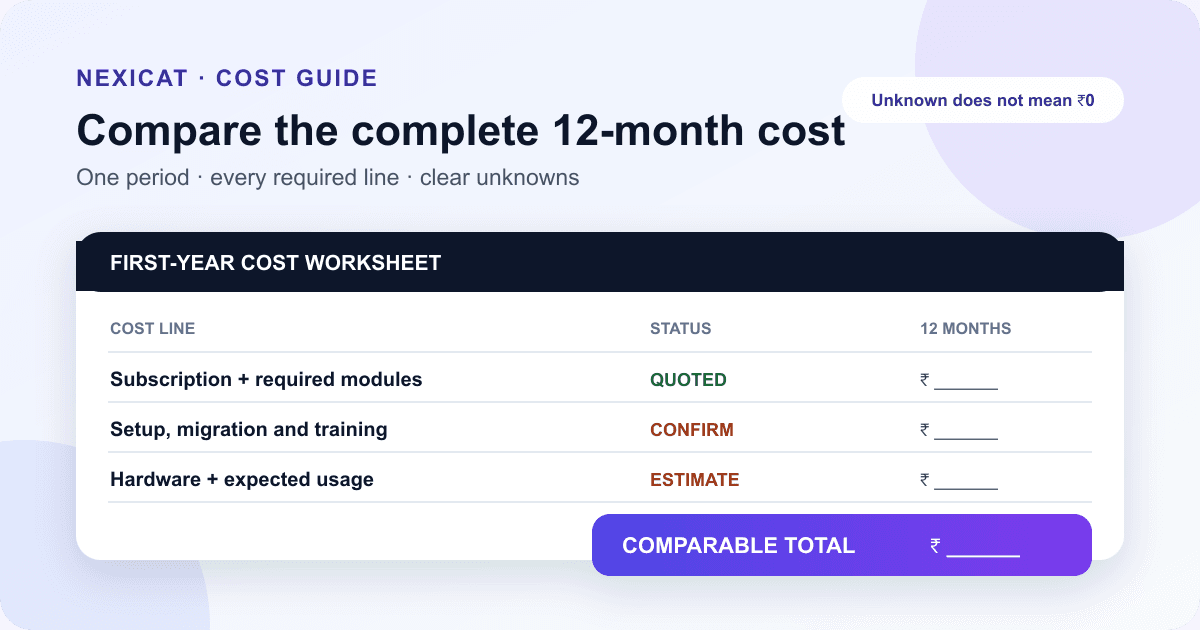
1. Start with the quote, not a market average
There is no dependable single price for gym management software in India. Vendors charge by month, year, branch, staff user, active member, feature tier or a combination. A low headline can exclude the member app, messages, onboarding, attendance hardware or the second branch.
Ask each vendor for a dated written quote using the same facts: number of branches, active members, staff accounts, required apps, expected message channels, attendance method, migration scope and support needs. Write whether the amount includes applicable taxes. A directory range or an old comparison article is not a quote.
Nexicat's public pricing page listed one Complete Gym Management plan at ₹14,999 per year when this guide was checked on 17 September 2026. Treat that as a dated public price, not a permanent promise. Confirm the current amount, terms, included branches and services before purchasing.
2. Identify the unit that changes the price
Put the billing unit at the top of your comparison sheet. Common structures include:
- one flat subscription for the gym;
- a tier based on active members or staff accounts;
- a separate fee for every branch or location;
- feature tiers that unlock reports, apps or automations; and
- usage charges for messages, payments or other services.
Then model what happens when the gym changes. Ask for the price at today's size and at a realistic next step: another branch, more active members or additional front-desk accounts. Record when the higher price starts, whether unused accounts can be removed and whether annual prepayment changes the cancellation terms.
Do not compare “monthly” with “annual” by their labels. Convert both to the same 12-month period and include every compulsory charge.
3. Capture every first-year cost line
A useful first-year worksheet has separate rows for:
- software subscription or licence;
- extra branch, member, user or module fees;
- setup and configuration;
- data migration and validation;
- staff training and later refresher sessions;
- required attendance devices, cards, installation and maintenance;
- messaging, payment or other usage charges; and
- applicable taxes and contractually required support.
Mark each row as included, fixed, estimated from your usage, or unknown. An unknown is not zero. Assign an owner and date for the vendor to answer it.
Keep optional purchases separate from requirements. A biometric reader may be useful for one gym and unnecessary for another. Likewise, a branded app or custom integration should not inflate the base comparison unless it is part of your stated requirement.
4. Separate software price from messages and payments
When a quote says “WhatsApp included,” ask what that means. Is it a click-to-chat link, the WhatsApp Business app or messages sent through the Business Platform? Who provides the account, which categories are used, how many messages or credits are included, and who pays when usage grows?
Meta's official WhatsApp Business Platform pricing page says pricing depends on message category and market, with policy and service-window conditions. Check the current official terms with the vendor rather than applying one assumed rupee rate to every reminder or campaign.
For online payments, separate the gym software subscription from any gateway, settlement, refund or chargeback terms. Ask which payment flow the software provides and whether the member can still pay through cash, the gym's UPI process or another approved method. Do not describe every UPI payment as free: verify the actual provider and merchant arrangement.
5. Price the attendance method you will actually use
The attendance screen may be included while the physical access setup is not. Write down the chosen workflow: manual staff check-in, member QR, branch QR, RFID, biometric device or turnstile.
For hardware, ask who supplies, installs, configures and supports it; what happens during internet or device failure; which models are compatible; and who pays for replacement, cards or maintenance. Include a front-desk fallback in the demo so the gym can operate while a device is unavailable.
Do not buy hardware only because it appears in a package. Use the software demo checklist to test an active member, an expired plan, a duplicate scan and the fallback process before assigning a cost to the setup.
6. Put implementation and staff time into the budget
A “free” setup can still require owner and staff time. Ask for a written implementation plan covering data template, cleanup responsibility, test import or controlled entry, rejected records, configuration, staff training, acceptance checks and go-live support.
Estimate internal time using your own payroll or opportunity cost; do not borrow someone else's hourly figure. List the responsible role and expected hours for data review, plan setup, payment-method setup, permission checks, training and first-week reconciliation.
If the software does not support a verified bulk import, price controlled manual entry honestly. The Excel-to-gym-software migration guide provides a field map, test batch and sign-off process. “Migration included” should state which records, history and corrections are included.
7. Ask what it costs to leave or change course
Price is also affected by commitment and exit conditions. Record the minimum term, renewal method, notice period, refund conditions, price-review clause and what happens when you reduce branches or users.
Ask for a sample export before signing. Which member, membership, invoice, transaction, attendance, lead and class fields can you retrieve? Is the export self-service? Is there a charge or waiting period? How long is data retained after cancellation, and who helps verify the final copy?
CERT-In's cybersecurity baseline for MSMEs recommends regular backups and access controls. Apply the same discipline to exported business data: restrict the file, verify it, store it in an approved location and avoid keeping unnecessary personal-data copies.
8. Calculate a comparable 12-month total
Use the same formula for every vendor:
First-year total = subscription + compulsory add-ons + setup + migration + training + required hardware + estimated usage charges + applicable taxes
For later years, remove truly one-time costs and add maintenance or replacement amounts that the contract requires. Keep uncertain usage as a low, expected and high scenario rather than hiding it inside one precise number.
Here is a fictional arithmetic example: a ₹12,000 annual subscription, ₹3,000 setup, ₹6,000 required device and ₹2,000 expected usage/support produces ₹23,000 before applicable taxes in year one. The figures are not Nexicat prices or market benchmarks. Their purpose is to show why a ₹12,000 headline and a ₹23,000 first-year total answer different questions.
9. Test value without inventing ROI
Do not assume the software “pays for itself.” Choose two or three measurable problems and establish your current baseline before purchase: staff time spent preparing renewal lists, unresolved balances without an owner, duplicate data corrections or empty class seats after no-shows.
Define the evidence you will review after an agreed period. Software may organise records and workflows, but member renewals, collections and staff time also depend on pricing, service, team behaviour and implementation. Avoid attributing every change to the tool.
For a decision scenario, divide the annual software cost by a value you can defend. For example, break-even memberships = annual cost ÷ contribution per additional retained membership. Use your accountant-approved contribution figure, not total membership price, and treat the result as a scenario rather than a promise that the software will create those renewals.
Continue with the gym management software ROI measurement guide to define the baseline, benefit evidence, attribution checks and review gates.
10. Compare Nexicat with the same worksheet
Nexicat connects member records, memberships, renewals, payments, invoices, attendance, classes, leads, staff permissions, reports and member/staff mobile workflows. Those capabilities are verified in the current product code and can be tested with the scenarios in this content cluster.
Use the same questions for Nexicat that you use for any vendor: confirm the current annual quote, applicable taxes, branches, setup, migration scope, supported attendance method, messaging channels, payment flow, support terms, data export and cancellation conditions. Public page wording can change, so the signed quote and terms should resolve the details.
Review Nexicat pricing, inspect the complete feature map, or book a demo with your branch, member and workflow requirements. A clear comparison is more useful than choosing the lowest headline or the longest feature list.
Bring your cost worksheet to a demo
Get a clear Nexicat quote for your actual gym.
Bring your branches, member count, attendance method and required workflows. Confirm the current price, inclusions, implementation scope and terms in one conversation.
Questions gym owners ask
How much does gym management software cost in India?
There is no reliable single market price because vendors charge by gym, branch, member, user, feature tier or usage. Nexicat's public page listed ₹14,999 per year when checked on 17 September 2026. Get a dated quote and calculate the 12-month total with setup, migration, hardware, messaging, payments, support and applicable taxes.
What hidden costs should I ask about?
Ask about extra branches and users, member limits, gated modules, data migration, training, attendance hardware, message credits, payment-provider terms, integrations, support, renewal increases, data export and cancellation. Mark unanswered items as unknown rather than zero.
Is annual or monthly gym software cheaper?
An annual plan may have a lower effective monthly price, but the commitment and refund terms can create risk if the workflow is untested. Compare both over the same 12 months and complete a realistic demo or trial before making a longer commitment.
How can I tell whether gym software is worth the cost?
Set a baseline for a few problems you can measure, define the expected workflow change and review the underlying records after implementation. Use your own staff costs and accountant-approved contribution figures. Do not treat vendor ROI claims or additional renewals as guaranteed outcomes.
About Nexicat Editorial. We write practical guides to gym operations and growth. Sources linked beside the relevant guidance were checked on 17 September 2026. Prices and terms can change. This guide is an operational comparison method, not a binding quote, tax or accounting advice, a market benchmark, or an ROI guarantee.