
Membership management software · India
Gym Membership Management Software in India: A Lifecycle Guide
Connect every member to a clear plan, dated membership window, payment trail, access state and renewal or freeze workflow.
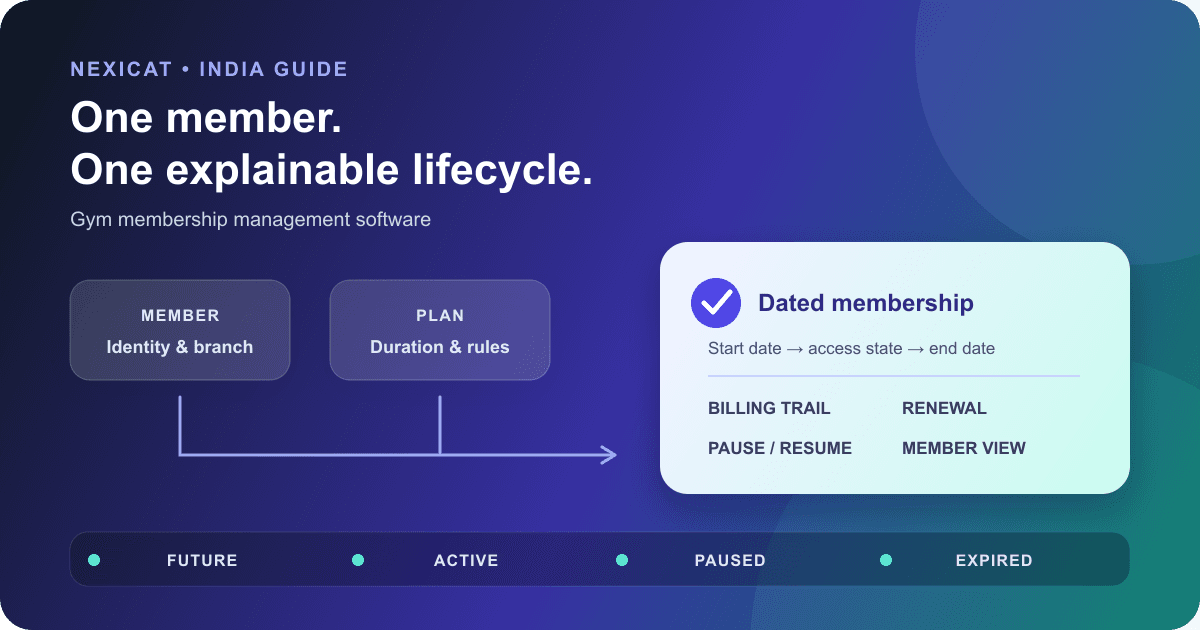
1. Separate the member, plan and membership records
A person is not a membership plan, and a payment is not proof of current access. Gym membership management software should connect four records without treating them as one:
- Member: the person's identity, contact details, branch and authorised profile information.
- Plan: a reusable commercial offer with a name, duration, price and operating rules.
- Membership: the plan assigned to one member for a specific start and end window.
- Billing: the invoice, payment, receipt, balance and refund records for that sale.
This separation matters when a member renews onto a different plan, freezes for part of a term, pays only part of an invoice or remains able to view account history after gym access ends.
During a demo, ask the vendor to open each record behind one member. If changing the plan catalogue silently rewrites an existing member's agreed dates or price, the model is too ambiguous for reliable front-desk work.
2. Control the plan catalogue before selling from it
Create a short approved plan catalogue instead of letting staff type a new plan name for every sale. For each plan, document:
- public operating name;
- duration and how the end date is calculated;
- base price and authorised discount rule;
- whether the plan is available for new sales;
- renewal pricing rule;
- freeze allowance, if offered; and
- branch or service restrictions outside the software, where applicable.
Deactivate an old plan rather than deleting the meaning of historical sales. Test whether an inactive plan remains visible on an existing member and past invoice while disappearing from the new-sale list.
Nexicat's current plan model includes name, description, duration, base price, discounts, renewal-discount handling, active status and an optional maximum freeze-days allowance per renewal. Tax and invoice configuration is a separate decision; confirm it with your accountant and the gym billing software guide.
3. Use membership states the front desk can explain
Write the allowed states and transitions before configuring the software. A useful operating model may distinguish:
- Future: sold, but the start date has not arrived.
- Active: within the approved membership window and eligible for gym services.
- Scheduled pause: active now, with an approved future freeze.
- Paused: temporarily unable to use gym services during an approved window.
- Expired: the end date has passed without a completed renewal.
- Inactive or cancelled: manually closed under an authorised process.
Do not collapse “did not pay,” “expired,” “paused” and “cancelled” into the same label. Staff actions differ, and a member should receive the correct explanation.
Test each state against attendance, class booking, member-app access and renewal. Nexicat's current backend separates app account access from gym-service eligibility, so an inactive or paused member can still use appropriate self-service views while service actions are refused.
4. Define start, end and renewal date rules
Membership dates are business calendar dates, not whatever time a browser or phone happens to send. Agree on one gym timezone and show the start and end date clearly to staff and members.
Use fictional cases to expose ambiguity:
- a plan starting today;
- a plan sold today but starting next Monday;
- a renewal purchased before the current term ends;
- a renewal beginning on the current end date versus the next date;
- a transaction close to midnight; and
- a device with the wrong local clock.
Record the expected inclusive or exclusive rule in plain language. Do not infer it from a “30 days” label.
Nexicat currently transports membership dates as calendar-day values, applies the gym timezone in the backend and rejects a renewal start before the existing membership end date. Confirm the exact hand-off date you want during the demo.
5. Enrol once, then connect the operating history
Before creating a new member, search by approved identifiers such as contact number or email to reduce duplicates. Then capture only the fields the gym has a clear operational purpose for and validate the member's selected plan, dates and payment before final submission.
Use MeitY's official Digital Personal Data Protection Rules, 2025 page as a starting point for the notified rules and phased timeline. Obtain qualified privacy advice for notices, consent or other lawful-use questions, access, correction, retention, deletion and vendor responsibilities.
A completed enrolment should leave the team able to trace the member, membership window and finance documents. If a lead was converted, preserve the source-to-member connection rather than manually creating a second unrelated profile. The new-member onboarding checklist covers the operational hand-off after the account exists.
6. Treat a renewal as a new decision
A renewal is not merely pushing the expiry date forward. Confirm the selected plan, new start date, price, discount authority, payment, balance and any trainer assignment before completing it.
Test these renewal cases:
- same plan before expiry;
- different plan after expiry;
- future-dated renewal;
- partial payment;
- declined or unverified payment;
- member currently paused; and
- duplicate submission after a slow response.
The system should not mark the renewal complete because a reminder was sent or a payment screenshot exists. Keep message status, membership status and financial status separate. The renewal reminder templates explain the communication workflow without assuming automatic delivery.
Nexicat's current renewal service validates the member and plan gym, prevents an overlapping start, updates the membership window and creates connected invoice, payment and receipt records for a successful payment workflow. It does not turn every external payment claim into verified settlement.
7. Make freezes a dated, limited workflow
If the gym offers membership freezes, publish the rule before staff use the feature: eligible plans, maximum days, earliest start, evidence if required, who approves it, whether access stops, and how the membership end date changes.
Record the freeze start, freeze end, reason, approver and days used. Then test a scheduled future freeze, immediate freeze, early return, attempted overlap, request beyond the plan allowance and freeze extending past the current membership end.
Nexicat's current workflow supports immediate or scheduled freezes, validates dates against the membership window and plan allowance, blocks gym-service access while paused, and supports unfreezing. The member app exposes current membership and pause information. These behaviours still need to match the written policy your gym gives members; software does not create that policy for you.
8. Correct membership errors without hiding money
Define who may correct a plan, start date, end date, freeze or active state after sale. A membership correction and a financial correction are separate actions. Changing access dates should not erase an invoice, collected payment, receipt or refund trail.
Use a wrong-plan scenario in the demo. Ask the vendor to show the original sale, authorised correction, revised member state, affected balance and report output. If the system only offers permanent deletion, ask how the gym will explain a previous receipt or audit a staff mistake.
Nexicat keeps member operations connected to invoices, transactions, receipts and refunds, with permissions around staff actions. This article does not claim an immutable audit history for every membership-field edit. If field-level change history is required, request a demonstration and written confirmation.
9. Give members and staff one explainable answer
The front desk and member app should agree on the current plan, validity dates, pause state and finance documents. They may show different detail, but they should not contradict each other.
Test a member login for active, future, paused and expired cases. Check what remains visible when gym-service access is unavailable. Then use a restricted staff account to confirm that the person can perform daily membership work without gaining unnecessary finance or configuration access.
Nexicat's member app currently shows membership details, available plans, invoices and pause workflows, while web and owner/staff mobile tools support member profiles, plans, renewals, freezes and payment history under role permissions. Confirm which actions are self-service, requests or staff-only in the current release.
10. Run a membership-lifecycle demo in Nexicat
Ask the demo team to use fictional data and show:
- an approved plan with duration, price and freeze allowance;
- a future-dated enrolment with connected billing records;
- the same member visible on web and in the member app;
- a valid check-in and an expired-member refusal;
- a future-dated renewal that does not overlap the current window;
- a scheduled freeze, active freeze and early unfreeze;
- an incorrect plan or date corrected by an authorised role;
- the renewal pipeline and member payment history; and
- a restricted staff account denied a sensitive action.
Nexicat's verified current capabilities cover membership plans, enrolment, renewal, freeze/unfreeze, access-state checks, upcoming-renewal reporting, connected billing records, role permissions and member self-service views. Automatic WhatsApp sending, recurring payment settlement, arbitrary plan upgrades, contract e-signature and a field-level audit log are not claimed here.
Explore memberships and renewals in Nexicat or book a demo. Use the same fixtures for each product so you compare observable lifecycle behaviour instead of feature names.
Test the lifecycle, not only the member list
Test membership management in Nexicat.
Bring future, active, expired and paused member scenarios. Test enrolment, renewal, billing, access, self-service, corrections and staff permissions.
Gym membership software questions
What is gym membership management software?
It connects member profiles, reusable plans, dated membership windows and billing records so staff can enrol, renew, pause, reactivate and report on memberships with clear status and ownership.
What membership states should gym software support?
The exact model depends on gym policy, but future, active, scheduled pause, paused, expired and manually inactive or cancelled states should be distinguishable where they lead to different access or staff actions.
Should renewing a gym membership overwrite the old record?
A renewal should preserve enough commercial and financial history to explain the earlier sale while creating the new dated decision. Ask the vendor to demonstrate past invoices, payments and previous membership information rather than assuming a changed expiry date is sufficient.
Does Nexicat support membership freezes?
Nexicat's current verified workflow supports immediate or scheduled freezes, plan-based freeze-day allowances, gym-service restrictions while paused, and unfreezing. Confirm that its date and approval behaviour matches the policy your gym gives members.
About Nexicat Editorial. We write practical guides to gym operations and growth. Sources linked beside the relevant guidance were checked on 1 October 2026. This guide provides general operational information, not privacy, accounting, tax, contract or legal advice. Product and regulatory requirements can change. Verify the setup with relevant specialists and qualified advisers.