
Personal training operations · India
Personal Training Management Software in India: Sessions and Payouts
Connect each PT service to dated sessions, delivery evidence, member payments and reviewed trainer payouts.
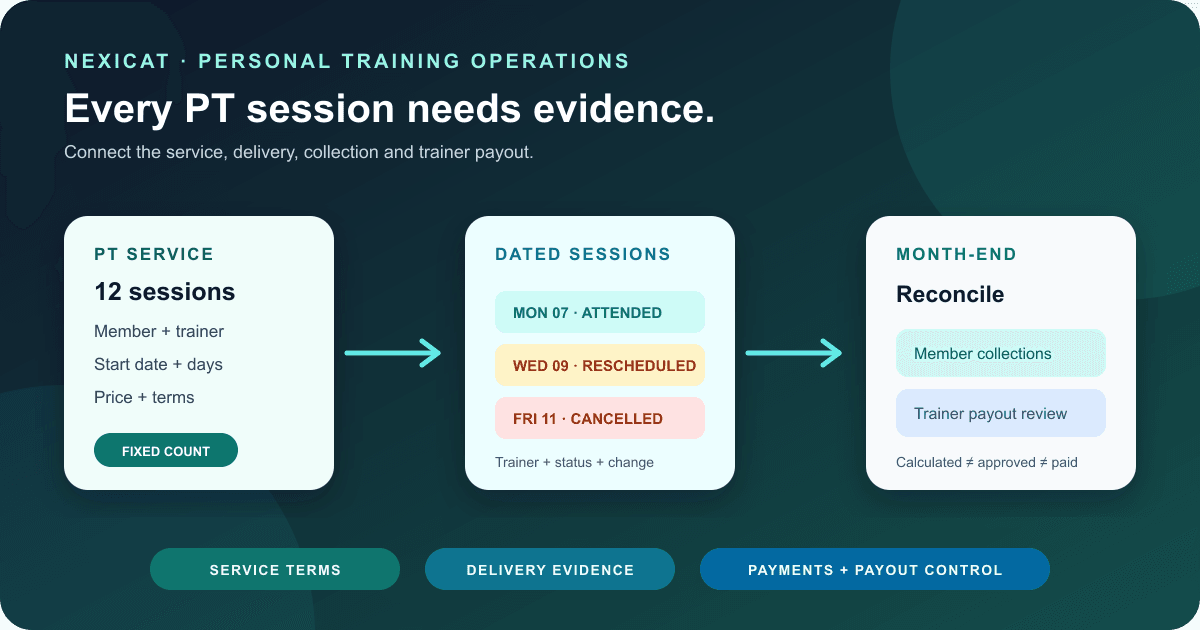
1. Separate five personal-training records
Personal training management software should let an owner explain five related records without merging them:
- Member: the person and their gym membership.
- PT service: what was sold, including session count, dates, price and rules.
- Scheduled session: the dated appointment, member and assigned trainer.
- Payment: the amount due, collected and still pending.
- Trainer payout: the approved compensation rule and its evidence.
A gym membership is not automatically a PT package. A scheduled session is not proof that training occurred. Money collected from the member is not automatically money owed to the trainer. Keeping these boundaries visible makes corrections and month-end review possible.
Nexicat's current class model can represent private one-time or fixed-count schedules with selected members, trainers, dated occurrences, bookings, payments and commission rules. This article does not rename that model as a dedicated PT-package ledger or claim every PT contract rule is supported. Demonstrate your exact service before relying on it.
2. Define the PT service before entering a price
Write the operating rules first: total sessions, start date, permitted days, expiry, rescheduling, late cancellation, trainer substitution, pause, refund and whether a gym membership must remain active. Make the sales description match the signed or accepted terms.
Avoid storing a twelve-session service as a vague monthly note. The software should preserve which dates were planned, changed, cancelled and completed. If an exception requires a manual adjustment, record who approved it and why.
Nexicat currently supports one-time, weekly and fixed-count class schedules. Private one-time and fixed-count schedules can be tied to selected members; the fixed-count service generates the required dated occurrences from a start date and chosen days. Current code does not establish a general PT-contract template, e-signature, arbitrary validity wallet, automatic package extension or member sign-off, so verify those requirements separately.
3. Assign a qualified trainer with the right access
Keep the trainer's identity, branch, role and active status separate from the member assignment. Record the evidence your gym requires for qualifications, experience, specialisms and current documents, then define who reviews it and when.
The National Skill Development Corporation's current occupational-standards listing includes Fitness Trainer and Personal Fitness Trainer qualification packs. Use current official or recognised requirements appropriate to the role; a name in gym software does not validate competence, scope of practice or legal eligibility.
Nexicat supports trainer staff records, role permissions, branch context, member-to-trainer assignment, class trainer selection and active trainer options. It does not claim to verify certificates, background checks, medical scope or professional registration. Test that a trainer sees necessary client and session information without receiving unrelated payroll, finance or settings access.
4. Turn the package into dated sessions
Create a fictional fixed-count service and inspect every generated date. Check holidays, the gym's time zone, skipped days, a trainer change, one cancelled occurrence and one rescheduled occurrence. A package balance should be traceable to individual sessions rather than reduced by an unexplained number.
Nexicat's current fixed-count schedule derives dated sessions from the start date, selected weekdays and class count. Private schedules synchronise bookings for selected members. Occurrence-level changes can replace the default trainer or date, and cancellations are retained as occurrence decisions.
Do not assume that rescheduling automatically preserves every commercial rule. Verify what happens to the booking, payment, trainer assignment, commission evidence and member view. For shared classes, use the class no-show and waitlist guide; a one-to-one PT session may need different cancellation handling.
5. Define what proves a session was delivered
Choose an observable status model: booked, attended, no-show and cancelled, with a dated trainer or authorised-staff action. Decide whether the member must confirm, whether the trainer may mark their own session and which corrections need owner approval.
Nexicat's booking model includes BOOKED, WAITLIST, CANCELLED, ATTENDED and NO_SHOW statuses and stores the instructor for a booking or occurrence. Those records support a delivery trail, but this review did not verify member digital sign-off, location proof, video evidence or tamper-proof audit history.
Test a session marked attended by mistake, a trainer substitution and a member dispute. The system should preserve enough context for a manager to review the correction. Never use a progress measurement or body metric as proof that a paid session occurred.
6. Reconcile PT billing separately from the gym membership
Follow the PT service from price to invoice, collections and balance. Test full payment, partial payment, a failed or unverified transfer, a discount, cancellation and refund. Ask whether tax is calculated per service and how the gym's accountant expects PT revenue to appear.
Nexicat's current class finance flow records occurrence-level member payment obligations and connects collections to finance records. The class can carry free or paid pricing and tax-inclusive values. This does not prove bank settlement, tax correctness or that every PT refund scenario is automated.
Use the gym billing software guide to distinguish invoice, payment, receipt and outstanding amount. Obtain qualified accounting and tax advice for the service your gym sells.
7. Calculate trainer payouts from approved evidence
Write the compensation rule in plain language. Is the trainer paid per scheduled session, attended session, collected amount, package sale or another approved basis? What happens after cancellation, refund, trainer substitution or a rate change?
Nexicat's current class commission configuration supports enabled commission rules and fixed amounts or percentage types, while staff commission settings and payroll workflows can generate reviewed payout records. For fixed-count classes, the backend identifies scheduled sessions handled by each trainer, including occurrence-level trainer changes. Refund adjustments and payout statuses are separate records.
That capability does not choose the gym's fair or lawful rule. Test the exact event that creates commission and inspect the source transactions. Keep calculated, approved, paid, adjusted and cancelled states distinct. The gym staff management guide provides the wider compensation and payroll control model.
8. Give the member a clear, limited view
A member should be able to identify the trainer, session date, booking status and relevant payment without seeing another member or internal payroll. Test the upcoming and past-session view after a reschedule, cancellation and trainer substitution.
Nexicat's member app exposes class schedules, bookings, history, trainer details and trainer ratings for eligible completed bookings. It also provides member progress tools for exercises and weight history. Progress data is member-facing activity information; it is not a medical record, clinical outcome or guarantee of results.
Set a process for inaccurate data, inappropriate content and support requests. Explain who can edit progress entries and who handles a trainer-rating concern. Do not market health outcomes merely because the software can display measurements.
9. Close the PT month with four reconciliations
Review four fixed groups for the same period:
- services sold and their billed amounts;
- scheduled sessions by final status;
- collections and refunds tied to those services; and
- trainer commission calculated, approved, adjusted and paid.
Investigate differences instead of forcing totals to match. A package sold near month-end may be collected now but delivered later. A session delivered this month may belong to an earlier sale. A refund may reverse revenue and commission in different approval steps.
Nexicat has class payments, occurrence status, trainer assignment, commission calculation and payroll records that can support this review. The current product does not establish revenue-recognition policy, statutory payroll treatment or a universal PT profitability report. Define the report cut-off and obtain professional advice where required.
10. Run this Nexicat PT workflow demo
Use fictional staff and member accounts and ask the demonstrator to:
- create a private fixed-count service with price, dates and one selected member;
- assign an active trainer and prove branch and role access;
- inspect every generated occurrence in the gym's time zone;
- reschedule one occurrence, cancel another and substitute a trainer;
- compare staff and member views of bookings and trainer details;
- record booked, attended and no-show cases and correct one mistake;
- trace an invoice, partial collection and outstanding amount;
- explain the configured commission basis and source evidence;
- generate, review, adjust and approve a fictional trainer payout;
- test a refund or confirm the boundary of the offered workflow; and
- show how package expiry, member sign-off, qualifications, health records and exports work—or state that they are outside the current product.
Record expected and observed results, app version, configuration and responsible role. Do not use real member health, payment or credential data.
Explore Nexicat's class and staff features or book a demo with this exact scenario.
Test the PT service end to end
Test personal training operations in Nexicat.
Bring a fictional fixed-count service, member and trainer. Test the schedule, delivery statuses, collections, commission evidence, payout approval and exceptions.
Personal training software questions
What should personal training management software track?
It should keep the member, PT service, dated sessions, payments and trainer payouts distinct but connected. Owners should be able to explain schedule changes, delivery status, collections, refunds, trainer substitutions and commission evidence.
Can Nexicat manage fixed-count personal training sessions?
Current Nexicat code supports private fixed-count schedules with selected members, dated occurrences, trainer assignment, bookings, payments and commission rules. Confirm your package expiry, cancellation, refund, member sign-off and reporting requirements in the offered release.
Does gym software decide trainer commission rates?
No. Software can store and calculate an approved rule, but the gym must define the lawful and fair basis, effective dates, exceptions, approvals and supporting evidence. This article provides no percentage or salary benchmark.
Does Nexicat verify trainer qualifications?
No such verification is claimed. Nexicat can hold staff and trainer assignments, but the gym remains responsible for checking qualifications, experience, scope, documents and any applicable requirements through suitable sources and advisers.
About Nexicat Editorial. We write practical guides to gym operations and growth. Sources linked beside the relevant guidance were checked on 11 October 2026. This guide provides general operational information, not fitness, employment, accounting, tax, contract or legal advice. Products, software and requirements change. Verify the offered setup with Nexicat and relevant qualified advisers.