
Small gym software · India
Gym Management Software for Small Gyms in India: A Lean Starter Plan
Set up the essential member, payment and attendance workflows first, then add more only when your team has a real operating need.
1. Define a small gym by its operating model
For this guide, a small gym is a single-branch business with a lean team and an owner who still handles daily decisions. That definition is more useful than an arbitrary member limit. A 70-member personal-training studio may have complex bookings; a larger neighbourhood gym may run a simpler access-and-membership model.
Write down the work that repeats every day: new enquiries, joining, payment recording, check-in, plan expiry and staff handover. Then list the mistakes that hurt most, such as admitting an expired member, losing a payment reference or forgetting a promised callback. This becomes your software brief.
Do not begin with every feature a growing chain might eventually need. Begin with the few records that must agree at the front desk.
2. Start with four connected records
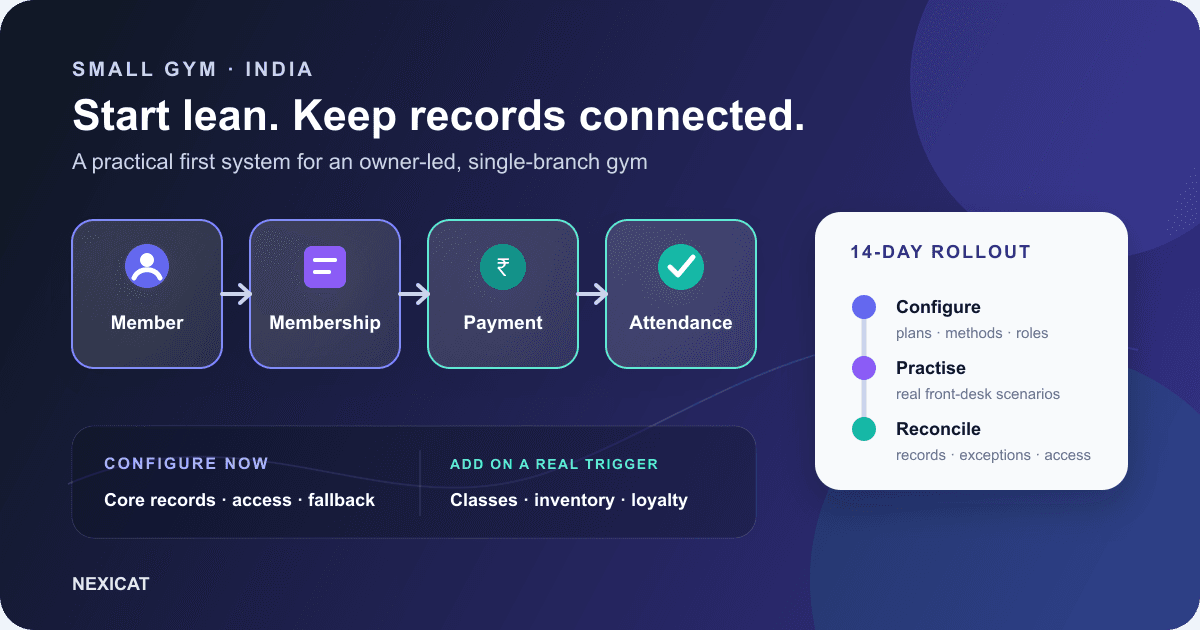
A useful starter system should connect four records:
- Member: name, contact details and the correct profile.
- Membership: plan, start and end dates, and current status.
- Payment: amount, date, method, reference and balance.
- Attendance: who entered, when and against which active membership.
Add a lead record if enquiries are already being lost between a call, a trial visit and a decision. The goal is one dependable answer when the owner asks, “Is this member active, what did they pay, and when did they last visit?”
Keep optional medical, identity and marketing fields out of the first form unless there is a defined purpose and approved handling process. Fewer, accurate fields are more useful than a large profile that staff cannot maintain.
3. Configure only what the desk needs first
Set up the items staff must choose during a real transaction:
- current membership plans, durations and prices;
- accepted payment methods and the reference staff should record;
- owner, manager and front-desk access;
- the check-in method and a fallback when a device or connection is unavailable; and
- a short list of lead statuses with one clear next action.
Archive duplicate or obsolete choices instead of copying every label from an old register. Use a naming pattern staff can recognise during a busy evening, such as “Monthly — General” rather than “Plan 1.”
If existing data lives in spreadsheets, use the Excel migration guide to map and test it. Do not assume a bulk import exists until the vendor demonstrates it with your template.
4. Give each person the access their shift requires
Shared owner credentials make a lean operation feel convenient, but they remove accountability and expose more data than the shift needs. Create named staff access and test it before go-live.
A front-desk role may need member search, joining, payment recording and attendance. A trainer may need assigned members or class information. Finance exports, permission changes and sensitive reports can stay with the owner or an authorised manager.
CERT-In's cybersecurity baseline for Indian MSMEs recommends access control, strong authentication, backups and prompt removal of access that is no longer required. Apply those controls practically: do not share passwords, review access when duties change and disable a departing staff account promptly.
5. Record cash, UPI and card payments consistently
The software record should match what actually happened. For every payment, capture the member, amount, date, method, status and an appropriate reference. If the member pays through the gym's UPI or another external flow, staff should not mark it paid merely because a screenshot is shown; follow the gym's verification process.
At closing, compare software totals with the evidence for each method. Investigate duplicates, reversals, partial payments and entries attached to the wrong member while the shift is still fresh. Keep the daily operations checklist beside this process.
Gym software can organise invoices, transactions and pending amounts. It does not replace the terms of your payment provider or accounting advice.
6. Choose the simplest reliable attendance flow
A small gym does not automatically need a biometric device or turnstile. Test the method against the actual entrance: manual staff check-in, a member QR flow or another supported setup. The best starter choice is the one staff can use accurately at peak time and recover when technology fails.
During a demo, test an active member, an expired membership, a frozen membership, a duplicate attempt and the fallback process. Then check whether the visit appears in the member history and the owner view.
Attendance becomes useful when it answers an operational question. Review members whose visit pattern changed, but do not treat low attendance as proof of dissatisfaction or send intrusive messages without context.
7. Build one follow-up queue before automating messages
Start with three practical lists: leads due for a callback, memberships approaching expiry and balances that need review. Assign each item to a person and record the outcome. An accurate queue is more valuable than automated messages based on stale dates.
If your gym uses WhatsApp, Meta's Business Messaging Policy requires the recipient's number and opt-in permission, and requires businesses to respect opt-out requests. Keep consent and channel preferences current. A software record or message preview does not by itself prove that an automated WhatsApp message will be sent.
For wording and exception checks, use the membership renewal reminder templates.
8. Use a 14-day rollout instead of a big-bang launch
A lean rollout keeps normal operations moving:
- Days 1–2: name the owner, clean plans and payment methods, create roles and choose the attendance flow.
- Days 3–5: enter or migrate a controlled batch of active members and reconcile memberships and balances.
- Days 6–7: practise joining, payment, renewal, check-in and correction scenarios with staff.
- Days 8–10: use the system during real shifts while keeping a written exception log.
- Days 11–13: fix configuration and training gaps, then review permissions and duplicates.
- Day 14: reconcile payments and active memberships, sign off the core workflow and schedule the first weekly review.
Keep the old record read-only during the agreed verification period where practical. Do not let staff update two systems indefinitely; that creates two competing versions of the truth.
9. Add features when a real trigger appears
Defer a module until you can name the workflow owner and the problem it solves. Add class booking when capacity, rosters or waitlists need active control. Add inventory when products and stock movements are regular. Add a member app when members have useful self-service tasks such as viewing attendance, memberships or bookings.
Use the same rule for dashboards: begin with active memberships, upcoming renewals, pending amounts, recent attendance and leads needing action. Add deeper reports when the owner has a recurring decision that the report can support.
This staged approach does not mean the later capabilities are unimportant. It prevents a small team from configuring everything at once and maintaining nothing well.
10. Test whether Nexicat fits your lean workflow
Nexicat connects member profiles, membership lifecycle, invoices and transactions, attendance, leads, staff permissions and reporting. Its broader feature set also covers classes, mobile workflows, inventory and loyalty. These capabilities are reflected in Nexicat's current product code and feature map; availability and setup for your gym should still be confirmed in a demo.
Bring five real scenarios: join a member, record the payment method, check the member in, renew the plan and restrict a front-desk role. Ask the presenter to complete each one from start to finish and show the resulting record. The gym software demo checklist gives you a scorecard.
Book a Nexicat demo with your current plans, team roles and attendance method. A useful first meeting should leave you with a clear starter scope, owners for setup tasks and a way to verify the first two weeks.
Bring five real workflows to a demo
See whether Nexicat fits your small gym.
Bring your current plans, payment methods, team roles and attendance process. Test joining, payment, check-in, renewal and permissions from start to finish.
Questions gym owners ask
What is the best gym management software for a small gym in India?
The best fit is the system your team can use accurately for the gym's real member, membership, payment and attendance workflows. Compare products with the same scenarios, verify permissions and support, calculate the full cost, and run a controlled rollout rather than choosing from a feature count alone.
Which features should a small gym set up first?
Start with member profiles, membership dates and status, payment records, attendance, staff permissions and a basic follow-up queue. Add class booking, inventory, loyalty, mobile self-service and deeper reports when a recurring operational need has an owner.
Does a small gym need biometric attendance?
Not necessarily. Manual or QR-based attendance may be sufficient if it is supported, accurate at peak time and has a clear fallback. Test active, expired, frozen and duplicate scenarios before buying attendance hardware.
How long should a small gym software rollout take?
There is no universal duration. This guide proposes a 14-day starter rollout for one branch, but the timeline depends on data quality, staff availability, migration scope and integrations. Define acceptance checks and extend the rollout when records do not reconcile.
About Nexicat Editorial. We write practical guides to gym operations and growth. Sources linked beside the relevant guidance were checked on 19 September 2026. Product capabilities, provider terms and legal requirements can change. Verify the current setup with the vendor and use qualified advisers where appropriate.