
Mobile gym operations · India
Gym Management App in India: Owner, Staff and Member Workflows
Evaluate the app as one connected operating system for owners, staff and members—not three disconnected screens.
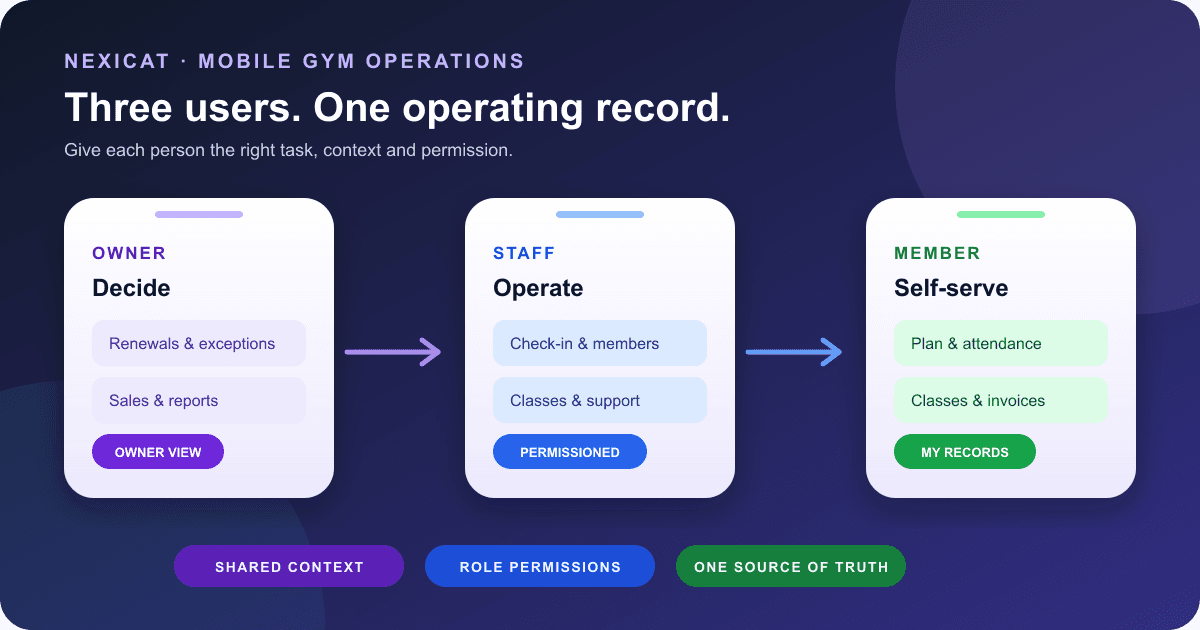
1. Start with three users and one operating record
A gym management app is useful only when it gives each person the right view of the same operation. Treat the mobile setup as three connected surfaces:
- Owner: exceptions, approvals and a quick view of the business.
- Staff: the branch tasks permitted for that role and shift.
- Member: self-service for their own membership, attendance and classes.
Ask what happens when a receptionist records a payment, a member opens an invoice, or a trainer updates a class roster. The answer should identify the source record, who may change it and where the update appears. Avoid a design in which each app keeps a separate version that staff must reconcile later.
Nexicat's owner and staff app and member app use the same backend as its web workspace. That supports connected records; it does not mean every web task belongs on a small screen or every role can see every field. Use the gym software demo checklist to test the complete workflow, not screenshots alone.
2. Decide what the owner should do on a phone
List the decisions an owner makes away from the desk: review renewals, inspect attendance, check a lead, open sales or reports, respond to an exception and contact support. Then separate quick mobile actions from configuration work that needs more context.
Do not assume that “available on mobile” means a dense desktop screen has been copied into an app. Test the shortest route to a member, today's attendance and a pending operational item. Check loading, empty and error states as well as the happy path.
Nexicat's current staff app exposes member and renewal workflows, attendance, classes, sales, leads, inventory, campaigns, reports, staff, payroll, loyalty and support. Access depends on the signed-in context and permissions. Exact availability can also depend on the offered release and configuration, so demonstrate the tasks that matter to your gym.
3. Prove staff permissions with an allowed and denied action
A shared phone login destroys accountability. Give each staff member their own identity, branch context and role. A receptionist may need member search and check-in without payroll access; a trainer may need class rosters without financial settings.
During evaluation, sign in with two fictional staff accounts. Complete one allowed task and attempt one denied task with each. Then change a role or deactivate an account and verify the next session. A hidden menu is not sufficient evidence; the backend must reject an unauthorised request.
Nexicat's mobile authentication keeps role and branch context, uses secure device storage for authentication tokens, and sends permission-bearing requests to the backend. Current screens and services use permission checks for relevant modules. This is a product-capability statement, not a security certification. For a wider review, use the gym software data-security checklist.
4. Test member self-service against the staff record
A member app should answer common questions without exposing another member's data: What plan do I have? When does it end? What attendance is recorded? Which invoices belong to me? What can I do next?
Create a fictional active member, expired member and paused member. Compare the status and dates in the member app with the staff record. Open membership details and invoice history, then make a controlled staff-side change and confirm how it appears. Test a missing or incomplete record rather than assuming the screen always has data.
Nexicat's member app currently provides membership and plan views, invoice history, attendance history and a pause-membership request flow. It does not make every correction a member action: staff still need controlled operational workflows. The membership lifecycle guide explains the dated states behind those screens.
5. Walk through attendance at the actual entrance
Test the app where check-in happens, at the busiest realistic time. Decide whether the branch displays a QR code, the member presents one, or staff record attendance. Check expired and paused memberships, duplicate attempts, the wrong branch, a camera-permission refusal and the history shown afterward.
Nexicat's reviewed mobile code supports branch QR generation for staff, member QR check-in, staff check-in and checkout, today's branch attendance and member attendance history. Do not infer biometric hardware, door control or offline check-in from those features. The app depends on current backend responses for these workflows.
Use the gym attendance software guide to compare QR, manual and biometric approaches and to plan a documented fallback when the chosen device or connection is unavailable.
6. Run one class from discovery to final status
Use a dated class with a trainer, capacity and two fictional members. On the member app, browse the schedule, view details, book a place, join a waitlist where offered, cancel and review upcoming or past bookings. On the staff app, open the same occurrence and inspect its roster and booking status.
Keep the class definition separate from a specific occurrence. A Tuesday cancellation should not silently change every future Tuesday. Ask who can change the roster and how attended, no-show, cancelled and waitlisted states are recorded.
Nexicat's current member services support class discovery, booking, joining a waitlist and cancellation. Staff services support dated occurrences, rosters and booking statuses. Do not assume automatic waitlist promotion or a universal cancellation rule; define the policy and verify the offered behaviour. The class no-show and waitlist guide provides a fair operational test.
7. Keep invoice visibility separate from payment settlement
A member seeing an invoice is useful, but it does not prove that a bank, UPI or card payment settled. Test what the member can view, what staff can record, how partial or pending amounts appear and which correction requires approval.
Nexicat's staff app exposes member payment history and invoice workflows, while the member app can retrieve its invoice records. The reviewed member-app flow does not establish an in-app payment gateway or automatic bank reconciliation, so this article does not claim either.
Follow one fictional membership charge through invoice, recorded payment, receipt and outstanding balance. Use the gym billing software guide to keep those records distinct and confirm tax treatment with a qualified adviser.
8. Evaluate engagement features as member actions
Notifications, progress, rewards, a store and support can make an app more useful, but their presence does not prove engagement. Test the member action and the staff follow-up behind each screen.
Nexicat's member app includes progress views, rewards and reward rules, store categories and products, notifications, trainers and support-ticket conversations. The staff app includes loyalty, inventory and support workflows. Availability and content depend on what the gym configures and records.
Ask whether a notification is in-app, push, SMS, email or WhatsApp; whether consent and opt-out apply; and who handles replies. Do not treat a notification list as proof that a message was delivered or acted upon. This article makes no retention, conversion or usage promise.
9. Test devices, accessibility, privacy and failure states
Run the owner, staff and member journeys on the Android devices and network conditions your gym expects to support. Check readable text, touch targets, focus and labels, colour contrast, zoom or font scaling, screen-reader basics, bright-light use and one-handed operation.
The W3C explains that existing accessibility standards apply to mobile experiences and highlights small screens, touch input and different usage settings in its mobile accessibility guidance. Treat accessibility as an acceptance test, not a badge inferred from the framework.
Also inspect camera and notification permissions, logout, token expiry, password recovery, app updates and what happens with a slow or lost connection. Do not promise offline operation unless the exact workflow queues, resolves conflicts and syncs demonstrably. For personal-data duties, start from MeitY's official Digital Personal Data Protection Rules, 2025 material and obtain advice for your situation.
10. Run this three-account Nexicat demo
Bring three fictional accounts and ask the demonstrator to:
- sign in as owner, restricted staff member and gym member;
- show that all three use the intended gym and branch context;
- complete one allowed staff action and prove one denied action;
- compare membership status, dates and invoice history across staff and member views;
- complete the chosen QR attendance journey and test a duplicate or invalid case;
- book, waitlist or cancel a dated class and inspect the staff roster;
- open progress, rewards, store, notifications and support from the member view;
- expire a session, sign out and test password recovery without real customer data;
- refuse camera or notification permission and simulate a poor connection;
- inspect text scaling, labels and touch use on your representative devices; and
- list every required web-only, unsupported or release-dependent task.
Record the app version, device, role, test data, expected result and observed result. Use fictional fixtures and never place customer credentials in a sales demo.
Explore Nexicat's member and staff mobile app features or book a demo with this exact script. A useful demo should expose boundaries as clearly as successful screens.
Test three connected mobile experiences
Test Nexicat on the devices your gym will use.
Bring fictional owner, staff and member accounts. Test permissions, attendance, classes, invoices, notifications and failure states on representative phones.
Gym management app questions
What is the difference between a gym management app and a member app?
A gym management app serves owners and authorised staff who operate members, attendance, classes, sales and other business records. A member app gives each member controlled self-service for their own membership, attendance, classes, invoices and engagement features. They should connect to the same source records while enforcing different permissions.
Can Nexicat members book classes and check attendance on mobile?
Current Nexicat member-app code supports class discovery, booking, waitlists and cancellation, plus member attendance history. Staff mobile workflows support dated class rosters and attendance operations. Verify the offered release, configuration and your exact policy in a demo.
Does the Nexicat gym app work offline?
This review did not verify a general offline mode, queued offline changes or conflict resolution, so no offline guarantee is made. Test each critical workflow on the networks your branch uses and document a fallback for outages.
Can a mobile app replace the gym's web workspace?
It can handle many daily and away-from-desk tasks, but a gym should decide which configuration, reconciliation, reporting and correction workflows need a larger screen or additional context. Test the complete owner, staff and member journey rather than assuming feature parity.
About Nexicat Editorial. We write practical guides to gym operations and growth. Sources linked beside the relevant guidance were checked on 10 October 2026. This guide provides general operational information, not accessibility, privacy, accounting, tax, contract or legal advice. Products, software and requirements change. Verify the offered setup with Nexicat and relevant qualified advisers.