
Staff management software · India
Gym Staff Management Software in India: A Control Guide
Control who can do what, record the work behind trainer payouts, and require a review before staff costs are marked paid.
1. Separate identity, access, work evidence and pay
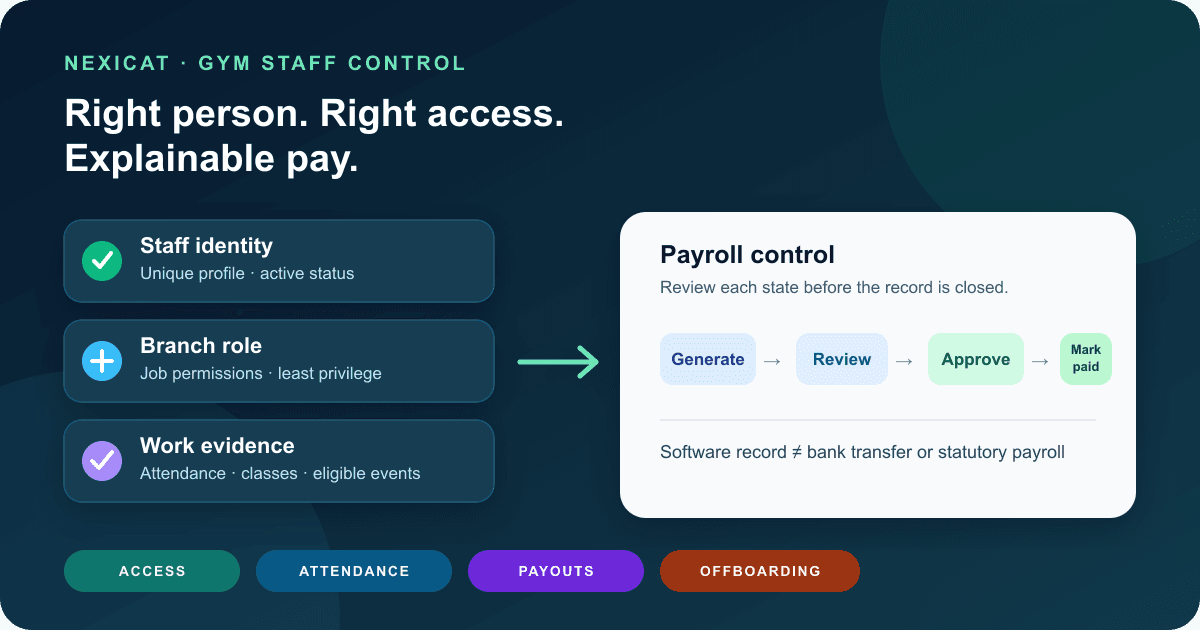
Gym staff management software should connect four different records without pretending they are interchangeable:
- Identity: who the person is and whether the staff profile is active.
- Access: the branch context, role and permissions the person needs for current work.
- Work evidence: attendance, class assignments, client responsibility and other approved operating records.
- Compensation: the salary or commission rule, calculation period, approval state and payment record.
A check-in proves that a person recorded attendance. It does not, by itself, prove every hour worked, every class delivered or the salary legally due. A role called “trainer” also should not automatically reveal revenue, settings or another branch's records.
Map these records before a demo. Ask the vendor to open one fictional receptionist and one fictional trainer, then trace what each person can see, what work evidence exists and how a payout reaches approval. This reveals more than a screen labelled “HR” or “payroll.”
2. Give each person one active staff record
Create an individual staff profile instead of sharing a front-desk login. Record only information the gym has a defined purpose for, such as name, contact details, employment start date, role and branch assignment. Decide who may create, edit and deactivate that record.
Use a controlled joiner checklist:
- confirm the correct branch and manager;
- select an approved role rather than copying another person's access;
- set the employment start date;
- test the staff member's own sign-in;
- verify one allowed and one denied action; and
- record who owns compensation setup.
For a multi-location business, do not treat a branch label as decoration. Test whether a staff member's active branch context limits member, attendance, finance and reporting actions. The multi-branch gym software checklist explains the wider branch-control model.
Nexicat currently supports staff profiles, roles, branch-scoped contexts and active or inactive staff status. Confirm the exact branch-assignment process for your planned structure during a demo.
3. Design roles around real jobs and least privilege
Start with job tasks, then grant the smallest useful permission set. A receptionist may need member search, attendance and approved collection actions. A trainer may need assigned clients, class rosters and personal attendance. A branch manager may need staff operations and branch reports. An owner may need wider finance and configuration access.
CERT-In's 15 Elemental Cyber Defense Controls for MSMEs recommends unique user IDs, role-based access aligned with job responsibilities, least privilege and access review after role changes or exits. Use that as a question baseline, not as a certification of any product.
Test four accounts in the demo: receptionist, trainer, manager and owner. For each, write three actions that must work and three that must be denied. Include a direct URL or mobile-navigation test; hiding a menu is not the same as blocking the action.
Nexicat's current access model includes module permissions and specific payroll actions for generating, viewing, approving and marking payouts paid. The same operating principle applies across owner/staff web and mobile surfaces, although available screens can differ.
4. Control joiners, role changes and exits
Access needs a lifecycle. When a receptionist becomes a manager, remove the old role if it is no longer needed and test the new permissions. When a trainer moves branch, verify both the new context and the loss of old-branch access. When someone leaves, deactivate access promptly while preserving authorised historical business records.
Keep a simple change record outside or inside the chosen system: person, previous role, new role, effective date, approver and completion check. Review shared devices, saved sessions and any credentials held outside the software as part of the exit process.
Run this fictional leaver test during procurement:
- mark a trainer inactive;
- attempt a fresh sign-in and an existing-session action;
- confirm the person disappears from new assignment lists;
- check that past classes, attendance and approved payouts remain explainable; and
- confirm who can reverse an accidental deactivation.
Nexicat supports updating a staff profile and setting it inactive. This guide does not claim automated deprovisioning from email, banking, biometric hardware or other external systems.
5. Treat staff attendance as evidence, not the final payroll answer
Define what a staff check-in means at your gym. Is one record allowed per gym-local date? Must the person check out? Who corrects a missed checkout? How are split shifts, approved off-site work, weekly offs and holidays handled? Software cannot resolve an unwritten employment policy.
Use test data for an ordinary day, a late check-in, a missing checkout, a device near midnight and a duplicate attempt. Check that the record uses the gym's intended local date and that an authorised manager can understand the exception before compensation is approved.
Nexicat's current staff attendance service records check-in and checkout, rejects a duplicate check-in for the same staff member and gym-local date, rejects checkout before check-in, and provides branch-day and monthly staff views. Its current salary generation uses the configured base salary; this article does not claim that raw attendance automatically calculates lawful deductions, overtime or leave.
Keep member check-in rules separate. The gym attendance software guide covers entrance methods and membership access rather than employee timekeeping.
6. Define trainer work evidence before defining commission
Trainer pay can depend on very different events: a delivered class, an assigned member, an approved personal-training session or an eligible sale. Write the qualifying event before entering a rate.
For class-based work, test the chain from instructor assignment to the date-specific session, roster or completion record and then the payout candidate. Ask what happens after a class is cancelled, reassigned, marked incomplete or corrected. For revenue-based commission, ask which transaction states and dates qualify, and how refunds or cancellations affect an approved amount.
Nexicat currently connects instructors to classes and supports staff-linked clients, salary configuration, class-session payouts and commission workflows. Its commission service distinguishes class and revenue calculations and prevents duplicate generation for the same basis. Eligibility still depends on the gym's written rule and the quality of the source records.
Do not pay from a trainer's private spreadsheet while the class roster says something else. Resolve the operating record first, then approve the payout.
7. Store compensation rules with effective dates
Separate the rule from the result. A salary configuration describes how a future period should be calculated. A payroll or commission entry records the amount generated for a particular period. Editing the rule should not silently rewrite an already reviewed payout.
For each rule, document:
- fixed salary or commission basis;
- amount, rate or per-session value;
- effective-from date and, where relevant, end date;
- branch and staff member;
- eligible event or transaction state;
- rounding and correction policy; and
- person authorised to approve a change.
Use fictional amounts in a demo. For example, change a trainer's per-session rate halfway through a future period and ask which rate applies to each session. The purpose is to expose the date rule, not to recommend a market salary or commission percentage.
Nexicat has separate salary and commission configuration endpoints plus payout records. Obtain qualified accounting, tax and employment-law advice for the actual structure; software configuration does not make a compensation policy compliant.
8. Require review between generation and payment
A useful operating sequence is generate → review → approve → mark paid, with controlled cancellation before payment. Generation should create a draft from the approved configuration and period. Review should compare the staff list, amount, source evidence and exceptions. Approval should be a deliberate permission. “Mark paid” should record an outcome only after the real payment process is confirmed.
Test these cases:
- active staff with a valid salary rule;
- active staff with no rule;
- inactive staff;
- duplicate generation for the same month;
- correction before approval;
- cancellation after approval but before payment; and
- an attempt to cancel a paid entry.
Nexicat's current payroll service generates pending salary expenses, skips duplicate staff/month entries, requires pending status before approval, requires approval before marking paid, and prevents cancellation after paid status. Commission payouts follow a similar reviewed-state workflow.
“Mark paid” is a software record. This article does not claim that Nexicat transfers money to a bank account, files payroll returns, produces statutory payslips or calculates PF, ESI, professional tax, TDS, overtime, leave or other legal entitlements.
9. Reconcile the staff-cost trail every period
Before closing a pay period, compare the active staff list, compensation configurations, generated entries, approved exceptions and confirmed payments. Investigate missing configurations, duplicate attempts, unexplained manual amounts and records still pending after the payment date.
A practical owner review asks:
- Which active staff were included or excluded, and why?
- Which entries changed after generation?
- Do class or revenue commission totals trace to eligible source records?
- Who approved each payout?
- Which entries are approved but not actually paid?
- Does the branch staff-cost total agree with the finance record used by the accountant?
Preserve the distinction between a cancelled record and deletion. If a correction is needed after real payment, obtain accounting advice and use an explainable adjustment instead of rewriting history.
Use the gym KPI guide to design a consistent owner review, but do not turn staff attendance or trainer load into a universal productivity target. Context, role and service quality matter.
10. Run this Nexicat staff-control demo
Bring fictional staff, branch and payout data. Ask the demonstrator to:
- create a receptionist and trainer with different roles;
- prove allowed and denied actions on web or staff mobile;
- show branch context and an attempted out-of-scope action;
- record staff check-in and checkout, then show monthly history;
- assign a trainer to a class and inspect the work record;
- configure a fictional salary or commission rule with an effective date;
- generate a payout and demonstrate review, approval and paid states;
- repeat generation to expose duplicate handling;
- deactivate the trainer and inspect access plus historical records; and
- state which bank-transfer and statutory-payroll steps remain outside Nexicat.
Also ask who may correct a mistake, which action history is available and how exports or accountant hand-offs work in the release you will use. Product behaviour can change, so verify required screens and permissions rather than relying only on this article.
For a wider procurement session, pair this test with the gym software demo checklist.
Test the controls with realistic roles
Test staff management in Nexicat.
Bring fictional receptionist, trainer and manager scenarios. Test permissions, branch scope, attendance, class evidence, compensation rules, payout approval and offboarding.
Gym staff software questions
What is gym staff management software?
It is software that connects staff profiles, branch and role access, attendance or work records, compensation rules and payout workflows. The exact scope varies, so buyers should test each operating step instead of relying on the label.
Should staff attendance automatically determine salary?
Not universally. Attendance can be one input, but salary, overtime, leave, exceptions and legal entitlements depend on the gym's policy and applicable requirements. Nexicat's current base-salary generation is not presented as an automatic statutory deduction engine.
How should a gym restrict staff access?
Use unique accounts, job-based roles, branch scope and least privilege. Test both allowed and denied actions for receptionist, trainer, manager and owner accounts, then review access whenever duties or employment status change.
Does Nexicat transfer staff salaries to bank accounts?
This article makes no such claim. Nexicat's current code supports salary and commission records with generation, approval and mark-paid states. Confirm the real payment, payslip, tax and statutory workflow separately with Nexicat and qualified advisers.
About Nexicat Editorial. We write practical guides to gym operations and growth. Sources linked beside the relevant guidance were checked on 3 October 2026. This guide provides general operational information, not accounting, tax, payroll, employment, privacy, security or legal advice. Product and regulatory requirements can change. Verify the setup with Nexicat and relevant qualified advisers.