
Software security · India
Gym Management Software Data Security in India: A Buyer Checklist
Turn vague security claims into practical tests for member data, staff access, branch separation, recovery and exit.
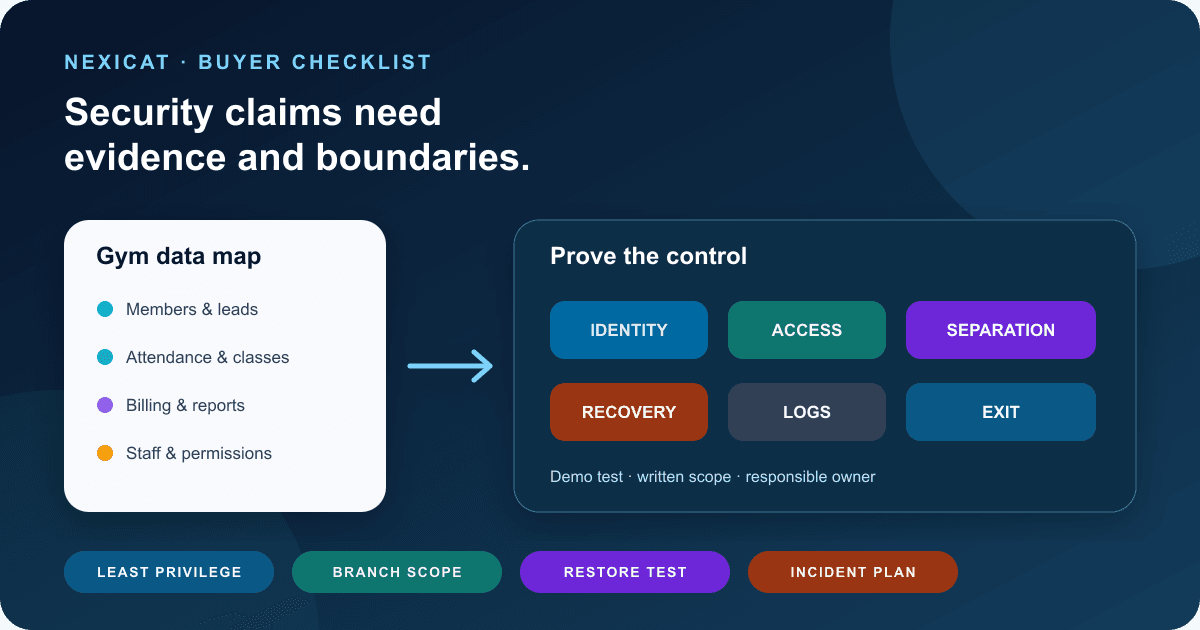
1. Map the data before asking whether software is secure
“Is it secure?” is too broad to produce a useful answer. First list the information your gym expects the system to hold and the harm that could follow from the wrong access, an incorrect change or prolonged unavailability.
A practical map may include:
- member identity and contact details;
- membership dates, attendance and class bookings;
- invoices, payments, refunds and outstanding balances;
- leads, follow-up notes and communication preferences;
- staff identities, roles, attendance and compensation records; and
- branch settings, reports, exports and connected services.
For each group, name the business owner, people who need access, correction process, retention need and acceptable recovery time. Do not upload real member data during a sales demo. Use fictional records that still expose your required permissions and workflows.
This map turns vendor claims into testable questions. “Encrypted” does not answer whether a receptionist can export every member, whether an ex-employee still has access, or whether a backup can actually be restored.
2. Define purpose, collection and retention
Collecting more fields does not make gym software more capable. Decide why each field is required, where the information comes from, who uses it, how long it is needed and what happens when it is corrected or removed. Health, identity and payment-related information deserve especially careful review because the consequences of misuse can be significant.
MeitY's official Digital Personal Data Protection Rules, 2025 page links the notified rules and supporting material. Use the current official text as a starting point and obtain qualified advice about your gym's role, notices, lawful use, consent where applicable, access, correction, erasure, retention, processors and incident obligations. This guide does not decide compliance.
Ask a prospective vendor for its current privacy terms and data-processing terms. Record which party decides the purpose for member data, which subprocessors are involved, where data is handled, and how a member request reaches the gym and vendor. A badge or the phrase “DPDP ready” is not a substitute for those answers.
3. Require unique accounts and least-privilege roles
Shared front-desk passwords remove accountability and make offboarding harder. Give each staff member a unique account, then assign only the branch and module permissions required for the job.
Build an access matrix with rows for receptionist, trainer, manager, accountant and owner. Add columns for member contacts, attendance, billing, refunds, staff compensation, reports, settings, exports and role administration. Mark view, create, edit, approve and export separately where the workflow requires it.
CERT-In's 15 Elemental Cyber Defense Controls for MSMEs recommends unique IDs, role-based access aligned with job responsibility, least privilege and access review after role changes or exits. Treat it as a baseline for discussion, not a product certification.
Nexicat's current code defines module and action permissions, active staff branch contexts, and server-side permission checks. Owners, managers, receptionists, trainers and general staff have different defaults that can be tested. Use the gym staff management guide for a full joiner, mover and leaver scenario.
4. Test gym, branch and member separation
A menu that hides another branch does not prove data separation. The server should reject an action when the authenticated person does not own the selected gym, branch or member context.
Use two fictional branches and two staff roles. Sign in as Branch A reception and attempt to open a known Branch B record, change the context header or URL, search for a Branch B member, and call an action that belongs to another role. Repeat the test in the staff mobile experience. Record the response and confirm that no partial personal or financial information appears in an error.
Also ask the vendor how it separates different customer gyms, how support access is controlled, and whether production customer data is ever used in demonstrations. A responsible demo should refuse to reveal another customer's environment.
Nexicat's current backend derives contexts from active staff branch assignments or linked member records and validates gym, branch and permission scope for protected operations. This code review is not a penetration test and does not prove every endpoint or infrastructure layer; buyers should request evidence appropriate to their risk.
5. Test authentication, sessions and recovery
Password policy is only one part of account security. Ask how passwords are stored, how access expires, how refresh or long-lived sessions are rotated, what logout invalidates, and what happens after a password reset or staff deactivation.
Run a harmless test:
- sign in on a browser and supported mobile device;
- log out from one device and observe the expected scope;
- request a password reset for a fictional account;
- try the reset link twice and after expiry;
- confirm whether existing sessions are revoked; and
- remove the person's active staff assignment and retry a protected action.
Nexicat's current backend hashes account passwords with BCrypt, signs expiring access tokens, rotates and revokes refresh tokens, consumes hashed time-limited reset tokens once, and revokes a user's refresh tokens after password reset. The current mobile apps use Expo SecureStore for authentication tokens. This article does not claim multi-factor authentication, single sign-on, device management or a particular production session setting; confirm requirements during the demo and in writing.
6. Follow data through payments and integrations
The gym platform is rarely the only system involved. Payment providers, messaging tools, email services, mobile push services, biometric hardware and analytics can each receive identifiers or events. Draw the path before approving an integration.
Ask which fields leave the gym platform, why they are needed, how the connection is authenticated, who can configure it, where failures appear and how access is removed. Do not paste API keys into chat, email, spreadsheets or screenshots. Use separate test credentials and least-privilege accounts where a provider supports them.
For payments, distinguish business records from payment credentials. A gym invoice, UPI reference or transaction status is not the same as storing card data or moving money. Ask the vendor and payment provider to state their respective responsibilities, redirect or token flow, reconciliation process and incident contact.
Nexicat connects operational payment records to members and invoices. This article does not claim that Nexicat stores card credentials, provides banking services, or carries any particular payment-security certification. Verify the configured provider and release you will use.
7. Ask for recovery evidence, not a backup slogan
A backup exists to support restoration. Ask what data and files are covered, backup frequency, retention, encryption, separation from the live environment, access control and the last successful restore test. Then agree on two business expectations:
- Recovery point: how much recent work the gym could need to recreate after an incident.
- Recovery time: how long critical operations could remain unavailable.
Use your own tolerances rather than accepting a universal number. A gym may need a documented fallback for member check-in, collections and class rosters while the service is unavailable. The fallback should avoid creating an uncontrolled spreadsheet of personal data.
CERT-In's MSME baseline recommends regular protected backups, periodic restoration tests and continuity planning. Nexicat's application repositories do not prove the production backup architecture or recovery performance, so this article makes no backup-frequency, data-location, uptime or disaster-recovery guarantee. Request current operational evidence and contract terms directly.
8. Define logs, alerts and incident hand-offs
Useful logs answer who accessed or changed a sensitive record, what action occurred, when it happened, and which gym or branch context applied. Security and business logs have different purposes: a payment correction history is not automatically an authentication alert, and an application error log is not automatically a complete audit trail.
Choose a few events that matter to your gym: repeated failed sign-ins, role changes, exports, refunds, settings changes, staff deactivation and unusual privileged actions. Ask which are recorded, who can see them, how long they are retained, how time is normalised and how alerts reach an accountable person.
Create an incident contact sheet before go-live: gym decision-maker, vendor support and security contact, technology provider, payment provider and qualified legal or privacy adviser. Define what evidence staff should preserve and who may communicate externally. Check current official reporting requirements rather than copying a timeline from a blog.
Nexicat code contains authentication rejection logging and operational records, but this article does not claim a complete customer-visible audit log, security monitoring service, incident-response SLA or regulatory reporting service. Test and contract for what you need.
9. Plan offboarding, export and deletion before purchase
Security includes leaving a system without losing control of the gym's records. Before signing, ask for a sample export and a written exit process. Which member, membership, attendance, class, lead, invoice, transaction and staff fields are included? Are stable identifiers and timestamps preserved? Who can request the export, how is it delivered, and how is identity verified?
Document what happens to active staff access, integrations, mobile sessions, vendor support access, backups and retained copies after cancellation. Retention and deletion can have competing legal and accounting requirements, so obtain advice rather than promising immediate deletion of every record.
Protect the export itself. Limit recipients, verify the file, transfer it through an approved channel, record where it is stored, and delete unnecessary copies after the authorised use. The Excel-to-gym-software migration guide provides a field map and reconciliation process for the next system.
Nexicat's current repositories do not establish a universal self-service export or deletion workflow for every module. Confirm the available format, scope, timing and contractual commitments for your subscription.
10. Run this Nexicat security and privacy demo
Use fictional data and ask the demonstrator to:
- show the data map for one member journey;
- create receptionist, trainer, manager and owner access;
- prove allowed and denied actions for member, finance, payroll and settings modules;
- attempt an out-of-branch record action;
- demonstrate password reset, session refresh and logout behaviour;
- deactivate a staff assignment and retry access;
- trace one payment record without exposing payment credentials;
- explain production backups and show appropriate restore-test evidence;
- show the logs or history available for two sensitive actions;
- provide current privacy, subprocessor, incident and data-exit documentation; and
- state clearly which requested controls are unavailable, planned or delivered by another provider.
Nexicat's code supports authenticated APIs, scoped contexts, role permissions, password hashing, expiring access tokens, rotating refresh tokens, password-reset session revocation and secure token storage in the mobile apps. Those are specific controls, not a promise that the whole deployment is invulnerable or legally compliant.
Pair this test with the broader gym management software demo checklist, and get material security, recovery and data-exit commitments in the contract for the release and hosting setup you will use.
Ask for evidence, scope and ownership
Test data controls in a Nexicat demo.
Bring fictional member and staff scenarios. Test permissions, branch scope, password recovery, session invalidation and documented answers for backups, logs, incidents and data exit.
Gym software security questions
What security questions should I ask a gym software vendor?
Ask about unique accounts, role and branch scope, authentication, session revocation, data isolation, integrations, backups and restore tests, logs, incident contacts, subprocessors, export and deletion. Request evidence for your exact plan and deployment instead of relying on broad labels.
Does encryption alone make gym management software secure?
No. Encryption can protect particular data paths or storage, but buyers must also examine identity, permissions, tenant separation, configuration, backups, monitoring, staff practices, incident response and recovery. Ask what is encrypted, where, with which responsibility and evidence.
Is Nexicat compliant with India's DPDP requirements?
This article makes no compliance claim. Nexicat has code-verified access and authentication controls, but compliance depends on the deployed service, contracts, processing purposes, organisational practices and current law. Review official material and obtain qualified advice.
Does Nexicat provide MFA, backups and a complete audit log?
Do not infer those capabilities from this article. The reviewed code supports permissions, scoped contexts and token-based authentication, while MFA, production backup evidence, recovery performance and a complete customer-visible audit log were not verified. Ask Nexicat to demonstrate and document each requirement.
About Nexicat Editorial. We write practical guides to gym operations and growth. Sources linked beside the relevant guidance were checked on 4 October 2026. This guide provides general operational information, not cybersecurity, privacy, accounting, contract or legal advice. Threats, products and regulatory requirements change. Use qualified specialists for your risk and current obligations.