
Inventory management · India
Gym Inventory Management Software in India: Stock and Sales Guide
Connect every product to explainable stock movements, counter sales and branch-level reconciliation.
1. Separate the product, stock movement and sale
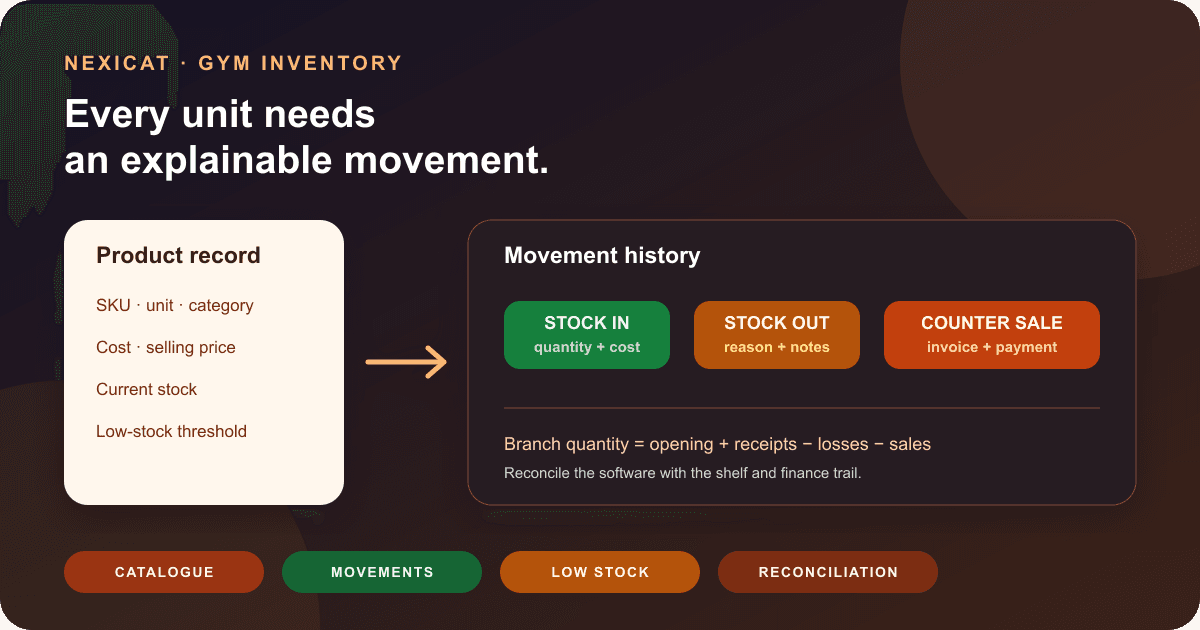
Gym inventory management software should connect three records without treating them as one:
- Product: the reusable catalogue item, category, SKU, unit and approved prices.
- Stock movement: why quantity entered or left the branch, when it happened and what it cost.
- Sale: what the member or walk-in customer bought, the amount charged and the connected invoice and payment.
Changing a product's selling price is not a sale. Receiving ten tubs is not revenue. Recording one damaged bottle is not the same as selling it. When these events are mixed into a single editable quantity, the owner cannot explain stock or finance totals.
During a demo, create one fictional shaker bottle. Add opening stock, receive more units at a different cost, sell one, remove one as damaged and then trace every change back from the final quantity. This simple test reveals more than a dashboard labelled “real-time inventory.”
2. Build a controlled product catalogue
Start with items the gym actually sells or consumes. Give each product a consistent name, category, SKU where useful, unit, cost price, selling price, MRP where applicable, opening quantity and low-stock threshold.
Define units carefully. A box containing twelve bars is different from one bar. If the gym buys by box but sells by piece, document the conversion process; do not silently change the unit after transactions exist. Use separate products for variants that need separate stock, such as flavour, size or pack quantity.
Deactivate an obsolete product rather than deleting the meaning of past movements and invoices. Test whether it disappears from new-sale selection while remaining understandable in history.
Nexicat's current inventory catalogue supports gym and branch scope, categories, product name, optional SKU, unit, MRP, cost and selling prices, opening stock, low-stock threshold, member-sale visibility and active status. It does not currently establish a general variant matrix, barcode catalogue, supplier record or batch/expiry field, so do not infer those capabilities.
3. Verify opening stock before migration
Count physical stock at a defined cut-off and enter only quantities the team can defend. Separate saleable items from damaged, expired, sample, personal-use or otherwise unavailable stock. Record the approved unit cost used for opening value and ask the accountant how that value should enter the books.
Use a sign-off sheet with product, unit, counted quantity, cost basis, counter, reviewer and date. Investigate duplicate SKUs, ambiguous pack sizes and negative spreadsheet quantities before import or entry. Keep the source sheet read-only after approval.
Nexicat creates an opening stock movement when a new product has a positive opening quantity and connects its cost to an inventory expense and transaction record. That is an operational implementation detail, not an accounting conclusion. Confirm opening valuation and tax treatment with your accountant.
If the gym is moving from spreadsheets, use the Excel-to-gym-software migration guide for field mapping, a test batch, rejection handling and reconciliation.
4. Record every receipt with quantity and cost
A stock-in record should state the product, quantity, unit cost, date and a note or reference that lets the team find the source document. Do not increase quantity manually and add an unrelated expense later; the two records can diverge.
When purchase costs change, decide how the software values remaining stock. Nexicat's current service recalculates weighted average cost when stock is added, preserves the before-and-after cost in the movement and can preview a target-profit or overridden selling price. Treat any suggested selling price as arithmetic, not a recommended market price or guarantee of margin.
Test receiving the same item twice at different costs. Verify the resulting quantity, weighted average cost, stock value and linked finance record. Then change only the selling price and confirm that historical movement values do not become the new price.
Nexicat does not currently claim purchase orders, supplier invoices, goods-received notes, landed-cost allocation or approval workflows. If your gym needs them, request a demonstration or keep the approved external process connected by reference.
5. Give non-sale stock-outs a reason
Stock can leave the shelf without being sold. Define a short reason list such as damaged, expired, personal use, complimentary issue, correction or other approved loss. Require a note when the reason alone cannot explain the event.
Restrict who can remove stock, and review unusual quantities or repeated “other” entries. A correction should not be used to hide a missed sale. If the physical count is lower than the system, investigate transactions and unit definitions before posting the authorised adjustment.
Nexicat's current stock-out workflow checks that sufficient quantity exists, reduces the branch product quantity, records weighted-average lost cost, creates a movement with reason and notes, and connects the loss to finance expense and transaction records. Current reasons include damaged, expired and personal-use cases in the web interface.
This record does not prove why a loss occurred or who physically handled the item. Define approval, evidence and escalation outside the screen where needed.
6. Connect the counter sale to stock and billing
For a sale, the product quantity and finance trail should move together. Test a member purchase and a walk-in purchase, supported payment methods, an approved discount, an attempted sale above available stock and a correction after a mistake.
Nexicat's current sale service checks available stock, optionally validates a member in the same branch, creates an inventory-source invoice and payment transaction, reduces stock, and writes a sale movement linked to the invoice and transaction. The movement retains quantity, unit selling price, cost and staff or member references where supplied.
The gym billing software guide explains why an invoice, payment, receipt and balance answer different questions. Ask an accountant to approve tax fields, item classification, discounts, returns and reporting. Software does not make a retail sale tax-compliant merely by generating an invoice.
Nexicat's reviewed inventory workflow does not establish a general returns, exchange, refund-to-stock or void-sale flow. Demonstrate your exact correction case before relying on the counter module.
7. Treat supplements as regulated products, not generic SKUs
If the gym sells health supplements or nutraceuticals, inventory accuracy is only one part of the responsibility. Check the product, source, label, storage, applicable licence or registration, invoice records, expiry handling and current requirements with qualified advisers.
FSSAI's official health supplements standards page links the applicable regulations, guidance and FAQs. Use current official material for the products you sell; this article does not interpret food law or recommend a supplement.
Capture batch and expiry information in an approved system if your operation needs it. Nexicat's current inventory product and movement models do not contain verified batch, lot or expiry-date fields. Although a manual stock-out can record an expired-item reason, that is not automated expiry tracking, FEFO allocation, recall support or a food-safety control.
Do not make health, performance or medical claims merely because a product is present in the catalogue. Inventory software records operations; it does not validate formulation, authenticity, suitability or permitted marketing.
8. Use low-stock views as a review queue
Set a threshold per product based on the gym's own replenishment time, selling pattern, storage limits and minimum order. A universal “five units” setting can create noise for slow items and shortages for fast ones.
Review low-stock and out-of-stock items on a fixed schedule. The person responsible should decide whether to reorder, change the threshold, deactivate the product or accept the shortage. Record the supplier process outside the inventory screen if purchase orders are not supported.
Nexicat supports product-level low-stock thresholds, filters for low and out-of-stock items, and branch inventory KPIs for product count, unit count, stock value, purchased cost, lost cost, sold revenue and sold cost. These are operational totals based on recorded movements and current data.
The current code does not verify automatic supplier ordering, reorder notifications, demand forecasting or purchase-order approval. A low-stock count is a prompt for judgement, not proof that replenishment is already underway.
9. Reconcile each branch with a physical count
Inventory belongs to a location. Count one branch at a time and compare physical quantity to the system as of a defined cut-off. For each difference, inspect opening stock, receipts, sales and non-sale stock-outs before posting an authorised correction.
Use a short cycle count for selected products weekly or monthly according to risk rather than waiting for a large annual surprise. Keep the counter and reviewer separate where practical. Review stock value, purchase cost, lost cost, sales revenue and sold cost with the connected finance records; none of those numbers alone equals accounting profit or cash.
Nexicat validates gym and branch scope for inventory products and movements and applies separate view, manage and sell permissions. Its current model does not establish inter-branch stock transfers or a central warehouse. Moving stock between branches therefore should not be represented as an unsupported single-click transfer.
Use the multi-branch gym software checklist to test wider branch ownership and reporting rules.
10. Run this Nexicat inventory demo
Bring fictional products and ask the demonstrator to:
- create categories and products with distinct units and SKUs;
- enter opening stock and inspect its movement and finance records;
- receive stock at a different unit cost and explain weighted average cost;
- compare an unchanged price, overridden price and target-profit preview;
- remove a damaged or expired unit with reason and notes;
- sell to a fictional member and a walk-in customer;
- attempt to oversell available quantity;
- trace the sale to its movement, invoice and transaction;
- filter low-stock, out-of-stock and movement history;
- prove view, manage and sell permissions with different staff accounts; and
- explain how your required returns, batches, expiry, suppliers, purchase orders, transfers and exports work—or confirm that they are outside the current product.
Nexicat's web and staff mobile apps expose the verified catalogue, stock action, sale and inventory-view workflows against the same backend. Product availability can still depend on release and configuration, so test the version offered to your gym.
Explore Nexicat's inventory and loyalty features or book a demo with the same product, quantity and exception fixtures so the result is comparable.
Test quantity, cost and finance together
Test inventory management in Nexicat.
Bring fictional products, receipts, losses and counter sales. Test branch scope, permissions, movement history, weighted cost, low-stock views and the linked invoice and payment trail.
Gym inventory software questions
What should gym inventory management software track?
It should separate products, stock movements and sales; preserve units, cost and quantity; record stock-in and reasoned stock-out; prevent overselling; show low and out-of-stock items; and connect retail sales to billing. Verify branch scope, permissions, correction workflows and required exports.
Can gym software manage supplement expiry dates?
Some products may, but do not assume it. Nexicat's current reviewed model does not include verified batch, lot or expiry-date fields. A manual expired stock-out reason is not automated expiry tracking, FEFO allocation or recall support.
Does Nexicat support gym counter sales?
Current code supports branch inventory products, stock checks, optional member linkage, inventory-source invoices and payment transactions, stock reduction and sale movement history. Confirm payment, tax, receipt, return and refund requirements in the offered release.
Does inventory software calculate profit automatically?
It can calculate operational cost and sales figures from recorded data, but those figures are not automatically accounting profit, cash flow or tax results. Stock accuracy, expenses, discounts, refunds and adviser-approved accounting treatment still matter.
About Nexicat Editorial. We write practical guides to gym operations and growth. Sources linked beside the relevant guidance were checked on 8 October 2026. This guide provides general operational information, not food-safety, accounting, tax, contract or legal advice. Products, software and requirements change. Verify the setup with Nexicat and relevant qualified advisers.