
Service quality · India
Gym Trainer Rating Software in India: A Feedback Guide
Collect session-linked trainer ratings fairly, read averages with their evidence and turn patterns into accountable coaching—not automatic judgement.
1. Decide what a trainer rating should measure
A star score should answer a narrow question: how did the member experience this trainer in a specific attended session? It should not pretend to measure clinical outcomes, exercise safety, total job performance or whether a member achieved a body-composition goal.
Write the question and scale before collecting data. For example: one star can mean the session needs follow-up, three can mean it met the expected service standard and five can mean it clearly exceeded that standard. Train members and managers on the same meaning. Without labels, two people can use the same number for very different reasons.
Keep trainer feedback separate from a member complaint ticket. A complaint needs conversation, ownership and resolution. A rating is a compact service signal that may tell a manager where to investigate.
2. Ask only after an eligible, attended session
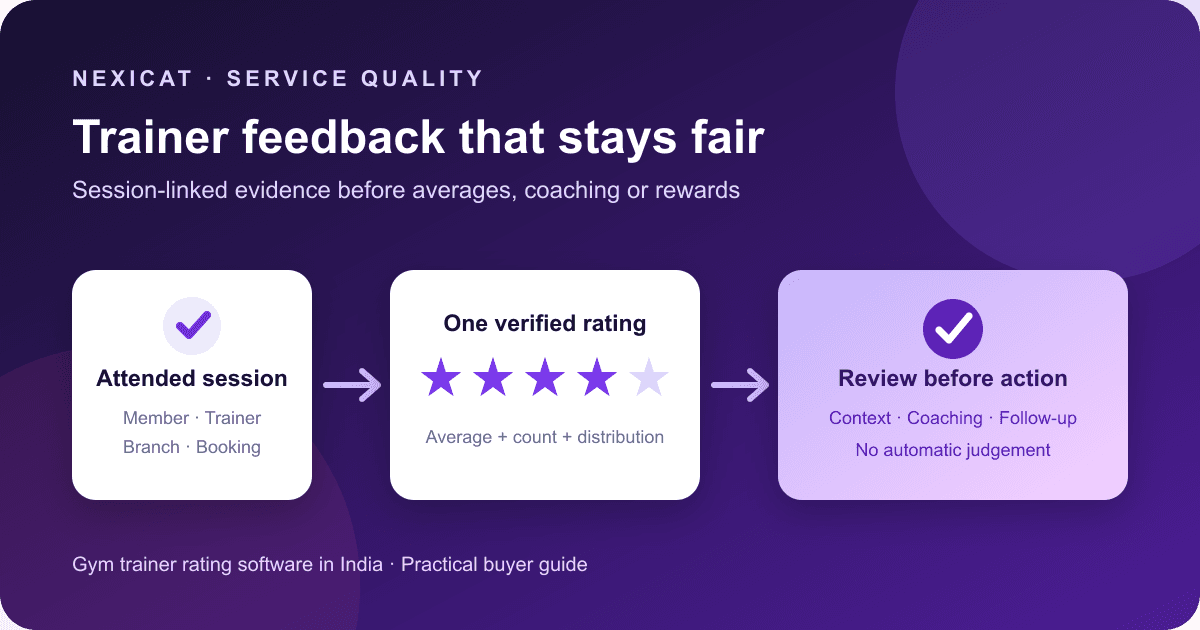
Tie feedback to a real service event. At minimum, the record should identify the member, trainer, branch, booking and session date. Do not invite ratings for cancelled, waitlisted or unattended bookings, and do not let a general profile score hide which service created it.
In Nexicat's current member app, the trainer-rating control appears for a class booking marked attended when a trainer and booking identifier are present. The submission carries a one-to-five rating and the booking reference. The stored rating is scoped to the gym, branch, member, trainer and booking.
That user-interface rule is useful evidence, but buyers should still test server-side eligibility. Try a cancelled booking, another member's booking, another branch and a booking assigned to a different trainer. A hidden button alone is not an access control.
3. Invite feedback consistently, not selectively
Choose an invitation rule that applies to every eligible member in the defined group—for example, after every attended coached class during the review period. Do not ask only visibly happy members or suppress low scores.
Nexicat's reviewed flow is an in-app rating action; it does not claim automated email, SMS, WhatsApp or push invitations. If staff prompt members in person, use neutral wording such as: “Your class is marked attended. You can rate the trainer in the app if you wish.” Avoid asking for five stars, offering rewards or watching over the member while they respond.
If ratings will be published online rather than used internally, review the Bureau of Indian Standards' IS 19000:2022 process-certification scheme. It addresses collection, moderation and publication of online consumer reviews. This guide does not claim that an internal trainer score is certified or that the standard applies in the same way to every implementation.
4. Keep one current rating per member, trainer and booking
Duplicate submissions can make a busy member look like several independent opinions. Use a stable event key and decide whether a member may correct a mistaken score.
Nexicat stores one rating for each member–trainer–booking combination. A later submission for the same combination updates that record rather than creating another one, and the trainer's average is recalculated from the stored ratings. The member interface can show an existing score and offer an update.
An update policy needs a reason and audit expectation. The current record keeps created and updated timestamps, but the reviewed workflow does not expose a public change history, written reason or manager approval for an edited score. Do not describe an editable score as an immutable audit trail.
5. Protect member identity and limit staff access
A rating can become sensitive workplace information when it is linked to a named member, employee and service event. Tell members why it is collected, who can see it, how it will be used and how long it is retained. Give managers access only when their role requires it.
Nexicat's owner/staff web flow requires staff-view permission for rating details and scopes staff records to the authenticated gym and branch. Rating detail can connect the score to its member and booking context; it is not an anonymous survey.
India's official Digital Personal Data Protection Rules, 2025 page includes the notified rules and enforcement timeline. Obtain qualified advice on notice, purpose, access, retention, correction, deletion and processor responsibilities. Product scoping alone does not establish legal compliance.
6. Read averages with the rating count and distribution
Never compare averages without the number of ratings. A trainer with one five-star score and a trainer with fifty scores averaging 4.7 do not have equivalent evidence. Also inspect the distribution: the same average can come from consistently similar ratings or a split between very high and very low experiences.
Nexicat stores the trainer's recalculated average, exposes rating details, and supports a service-quality report with average rating, rating count, five-star count and low one-to-two-star count. The report can filter rating bands and sort results. A monthly branch trend is also available.
These are descriptive measures, not proof that a trainer caused retention, revenue, fitness progress or safety outcomes. Avoid universal cut-offs. A displayed “below 3.5” report count is a software grouping, not an industry benchmark or an automatic disciplinary rule.
7. Investigate patterns before coaching or rewarding
Use a low score as a prompt to review the dated booking, class context, roster, trainer assignment and any separate support conversation. Look for repeated themes across enough comparable events. Give the trainer a fair chance to explain operational factors such as equipment failure, an overcrowded class or a last-minute substitution.
Do not publish a league table or change pay from a single score. If ratings influence incentives, write the eligibility period, minimum evidence, handling of edited ratings and review process in advance. Keep the source evidence aligned with the staff management control guide.
The current rating record contains a numeric score, not written member comments, manager notes, a coaching plan, appeal status or corrective-action workflow. Use an authorised people process for those decisions rather than forcing them into the star field.
8. Close the loop without exposing the member
When a pattern suggests a service gap, define the action: observe a class, refresh a standard, adjust a timetable, repair equipment or follow up through the support workflow. Record who owns the action and when it will be reviewed.
Protect the member from retaliation or awkward confrontation. Share the minimum information needed for improvement, especially when only one person attended a session and identity would be obvious. If a rating signals harassment, discrimination, injury or another serious concern, use the gym's trained escalation route rather than treating it as routine coaching data.
Nexicat's reviewed rating flow does not provide anonymous responses, written comments, manager replies, automatic low-score alerts, case creation or action-plan tracking. Those are separate requirements to evaluate, not capabilities to infer from a star chart.
9. Measure feedback coverage before score movement
Start with the denominator: eligible attended trainer sessions in a fixed period. Then count sessions with a rating and calculate feedback coverage = rated eligible sessions ÷ eligible attended sessions. Review edited ratings and missing trainer or booking references separately.
Coverage helps reveal selection bias. An average built from a small, self-selected subset should not be presented as the voice of all members. Compare trainers only across like-for-like services, time windows and branches, and preserve the rating count beside every average.
The current Nexicat service-quality report summarises submitted ratings, but the reviewed output does not establish an eligible-session denominator, response rate, automated bias correction, sentiment analysis, comment themes or causal link to retention. Build those definitions outside the score before claiming a representative result.
10. Test trainer feedback software with difficult cases
Use fictional members and ask Nexicat to:
- mark one class attended and prove the rating control appears;
- show that a cancelled, waitlisted or future booking cannot be rated;
- submit one through five stars and reject zero or six;
- update the same member–trainer–booking rating without creating a duplicate;
- test a booking from another member, trainer and branch;
- show who can open member-linked rating details;
- reconcile the trainer average with its underlying rating count;
- compare the rating distribution with the average;
- download or inspect the service-quality report and monthly branch trend; and
- identify comments, anonymity, invitations, alerts, moderation, replies, appeals and action plans as unsupported unless demonstrated.
Connect the result to the class booking workflow and personal training guide, then book a Nexicat demo with a fictional class history and your written feedback policy.
Test the evidence
Bring one difficult rating case to the demo.
Use fictional bookings to test attendance eligibility, duplicates, edits, branch scope, rating counts, distributions and the boundary between a service signal and a staff decision.
Gym trainer rating software questions
What is gym trainer rating software?
It connects a member's service score to a specific trainer and booking, then provides controlled access to averages, counts, distributions or trends. The rating should be treated as a service signal, not a complete measure of employee performance.
When should a gym ask a member to rate a trainer?
After a real attended session, using a consistent and neutral invitation rule. Do not invite only happy members, request a particular score or collect ratings for cancelled, waitlisted or unattended bookings.
Can a member update a trainer rating in Nexicat?
Yes. The reviewed flow keeps one rating per member, trainer and booking. A later submission for the same combination updates the record and recalculates the trainer average instead of adding a duplicate.
Should trainer ratings affect pay or discipline?
Not automatically. Review the rating count, distribution, comparable service context and underlying records, then use a written and fair people process. A single score or arbitrary average is weak evidence for a consequential decision.
Which trainer-feedback features does Nexicat currently support?
Reviewed code supports one-to-five ratings linked to member, trainer, branch and booking; one current rating per member–trainer–booking combination; editable ratings; recalculated averages; permission-scoped details; a monthly branch trend; and service-quality reporting. Written comments, anonymity, automated invitations, low-score alerts, manager replies, appeals and action-plan tracking are not claimed.
About Nexicat Editorial. We write practical guides to gym operations and software evaluation. Sources linked beside the relevant guidance were checked on 7 November 2026. This guide provides general operational and privacy information, not legal, employment or safety advice. Products and requirements change; verify the offered workflow and obtain qualified advice before rollout.