
Gym class operations · India
Gym Class Booking Software in India: A Scheduling Guide
Build a reliable path from recurring timetable to dated occurrence, eligible booking, controlled capacity and roster evidence.
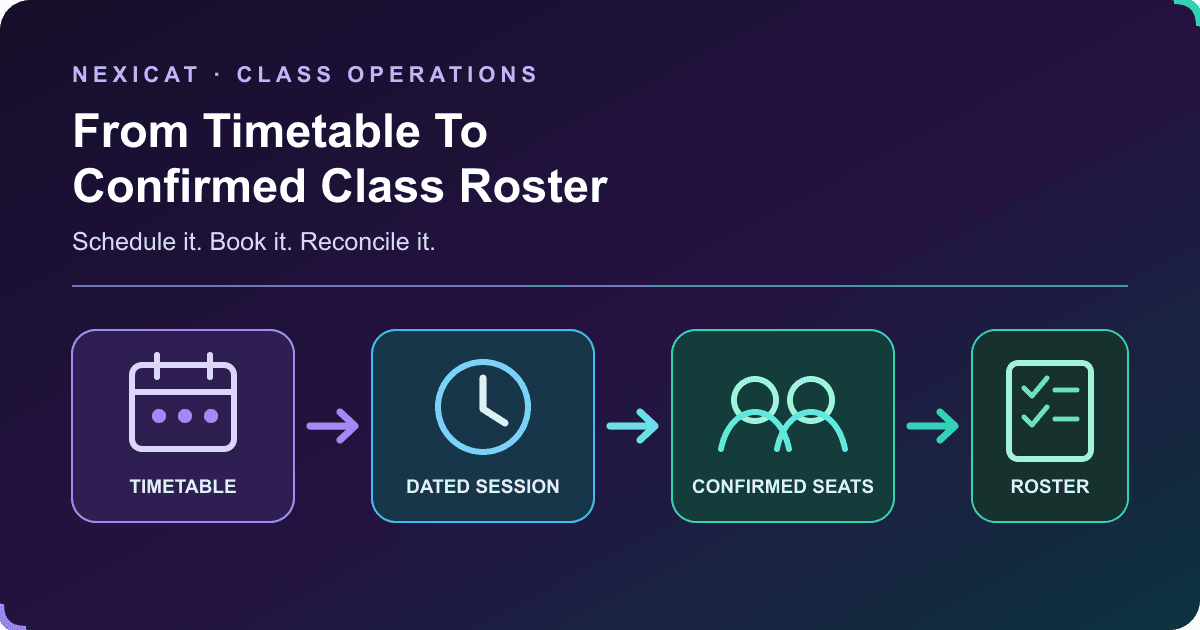
1. Separate the class, schedule, occurrence and booking
A reliable class-booking system keeps four records distinct:
- Class: the service members recognise, such as morning yoga or strength circuit.
- Schedule: the planned pattern, such as every Monday and Wednesday at 7:00 am.
- Occurrence: one dated session, with its actual trainer, room, time, capacity and status.
- Booking: one member's place and its current status for that occurrence.
This model matters when one session changes. A trainer substitution on Wednesday should not silently rewrite every future Wednesday. Cancelling one date should not delete the class history. A member's booking status should not be stored only as a name on a reusable class list.
Ask the vendor to show the four records and the links between them. A colourful calendar is useful, but it is not enough if staff cannot explain which dated session and member record produced each number.
2. Define the class rules before publishing the timetable
For every class, record the name, description, branch, room, visibility, trainer, duration, schedule type, booking window, cancellation rule, capacity and any payment or membership requirement.
Decide whether the service is public to eligible members or private to selected members. Keep a one-time workshop separate from a weekly group class and a fixed-count programme. If pricing applies, state whether access comes from a membership, a class-specific charge or another approved arrangement.
Do not assume that a visible class is bookable by everyone. Visibility, eligibility, payment and available seats answer different questions. Write these rules in plain language for staff and members before enabling self-booking.
3. Build the recurring timetable without losing dated control
Choose the schedule pattern that matches the service:
- One-time: a single workshop or event.
- Weekly: a recurring class on selected weekdays.
- Fixed-count: a programme with a defined number of sessions.
Set start and end dates, local start and end times, weekdays and trainer responsibility. Preview the generated dates before publishing. Test month boundaries, holidays and the gym's local time zone.
Then test the exceptions: edit one occurrence, substitute the trainer, change its room or capacity, reschedule it and cancel it with a reason. The rest of the series should remain understandable. Nexicat's current class model supports one-time, weekly and fixed-count schedules plus dated occurrence changes; ask to see how history and member-facing updates behave in the offered release.
4. Set an operating capacity that the room can actually support
A capacity field should represent the gym's approved operating limit for that class, not a number invented by software. Consider usable floor area, equipment stations, exits, the activity, trainer supervision and applicable building or fire-safety requirements.
Local requirements depend on the premises, activity and authority. Use the authorised occupancy and safety process for the branch; do not treat a booking-system limit as a safety certificate.
Test two members trying to take the final seat at the same time. A strong implementation should prevent overbooking at the data layer, show the resulting availability and offer the correct next action. Nexicat's current backend uses an occurrence-level seat check and rejects a booking when no seat remains.
5. Check eligibility before holding a seat
Before confirming a booking, test the member, branch, date, class and access rule together. A valid member record does not necessarily mean the person is eligible for every class.
Define what happens when a membership is expired, frozen or outside its valid dates; when the class is at another branch; when a private class excludes the member; or when a class-specific amount remains unpaid. Make the rejection clear enough for the member and actionable for staff without exposing private account information.
Nexicat's current member booking service validates gym and branch context, class ownership, booking date, member access and duplicate active bookings. Class payment records are linked separately. This article does not claim that every membership automatically includes every class or that an in-app payment gateway settles a booking.
6. Publish a fair waitlist and cancellation rule
When a session is full, let an eligible member join a dated waitlist without consuming a seat. Prevent duplicate booked or waitlisted records for the same member and occurrence.
Decide how a released seat is offered, how long a member has to accept it and what happens if nobody responds. Make the promotion method visible to staff. Do not advertise automatic waitlist promotion unless the actual product demonstrates it end to end.
When a booked member cancels, release the seat and preserve the cancelled record. Apply fees, credits or exceptions only through the gym's stated policy. The class no-show and waitlist guide provides a policy framework; the booking system should supply the dated evidence needed to apply it consistently. Nexicat supports booked, waitlisted and cancelled states, but this article makes no automatic-promotion or automatic-message claim.
7. Handle trainer, time and cancellation changes per occurrence
Operational changes should start from the affected dated occurrence. Record the original date, new date or time, trainer, room, capacity, status and reason.
Before saving a change, review the booked and waitlisted members, payment consequences and staff hand-off. A reschedule should not create two live occurrences for the same session. A cancellation should remain visible in history rather than disappearing from the calendar.
The National Skill Development Corporation's current occupational-standards listing includes Group Fitness Trainer among the fitness-sector roles. Use current role standards and the gym's approved qualification process when assigning an instructor. A software trainer field does not verify identity, competence, certification, substitution approval or scope of practice.
8. Turn the roster into session evidence
Open a roster for one class date, not a combined list for the whole series. Staff should see each member's booked, waitlisted, attended, no-show or cancelled status and update only authorised states.
Keep branch entrance check-in separate from class attendance. A member can enter the gym and still miss the booked class; another class attendee may require a roster correction even when the general check-in record is incomplete. Reconcile the two records instead of forcing one to stand in for the other.
Booking data is personal data. Review what trainers can see, how long records are kept and how member-facing notices explain the purpose. MeitY's official Digital Personal Data Protection Rules, 2025 page is a current starting point for the gym's privacy review. This guide does not provide a compliance conclusion.
9. Review demand, seat use and booking outcomes with fixed definitions
Choose a date range and branch, then keep the denominator visible:
- Booked seats: bookings holding a seat for the occurrence.
- Seat utilisation: booked seats divided by available capacity under a stated rule.
- Attendance rate: attended bookings divided by the eligible booked cohort.
- Cancellation and no-show counts: outcomes from that same cohort.
- Payment status: class-specific amounts due, paid or pending under the selected date rule.
Do not combine waitlisted members with occupied seats or call entrance scans class attendance. A full class does not prove profitability, and an underused class does not reveal the cause by itself.
Nexicat's current reports include demand and seat utilisation, booking-status and no-show analysis, class attendance audit, revenue and payment views. Use them to identify occurrences for investigation, then open the roster and source records before changing the timetable.
10. Run a booking demo with one difficult weekly class
Create a fictional weekly class with a small capacity, a trainer, room and clear eligibility rule. Then ask Nexicat to:
- preview the recurring dates and member-facing schedule;
- book eligible members until one seat remains;
- attempt two simultaneous final-seat bookings;
- join the dated waitlist after the class is full;
- block a duplicate and an ineligible booking;
- cancel one booking and inspect the released seat;
- explain whether waitlist promotion is manual or automated;
- substitute the trainer and reschedule one occurrence only;
- cancel another occurrence while preserving its history;
- mark attended and no-show outcomes on the dated roster; and
- reconcile demand, attendance and payment reports to the source records.
Use fictional members and make no payment during the demo. Explore Nexicat class scheduling features or book a Nexicat demo with this test script.
Test the booking workflow
Bring one difficult weekly class to the demo.
Use fictional members to test the final seat, waitlist, duplicate booking, trainer substitution, occurrence cancellation and report reconciliation.
Gym class booking software questions
What is gym class booking software?
It connects a class catalogue and timetable to dated occurrences, member bookings, capacity, waitlists, rosters, attendance outcomes and operational reports. The best evaluation follows one member and one occurrence through the complete workflow.
Can class booking software prevent overbooking?
It can enforce a configured seat limit when the booking operation checks capacity atomically. The configured number must still come from the gym's authorised room, equipment, supervision and safety process; software does not determine legal occupancy.
Should a waitlisted member count as a booked seat?
No. A waitlist record expresses interest after capacity is reached; it should not consume a seat until the member is promoted and holds a confirmed booking under the gym's process.
Is gym entrance attendance the same as class attendance?
No. A branch check-in proves entry under the gym's process, while class attendance records the outcome of a particular dated booking. Keep both and reconcile exceptions.
What class-booking features does Nexicat currently support?
Reviewed code supports one-time, weekly and fixed-count schedules; trainers, rooms and capacity; dated occurrences; public and private classes; bookings, waitlists and cancellations; attended and no-show statuses; member booking history; class payments; and class reports. Automatic waitlist promotion, universal messaging delivery and an in-app payment gateway are not claimed here.
About Nexicat Editorial. We write practical guides to gym operations and software evaluation. Sources linked beside the relevant guidance were checked on 24 October 2026. This guide provides general operational information, not safety, legal, privacy, certification or financial advice. Products and requirements change; verify the offered workflow and local obligations before rollout.